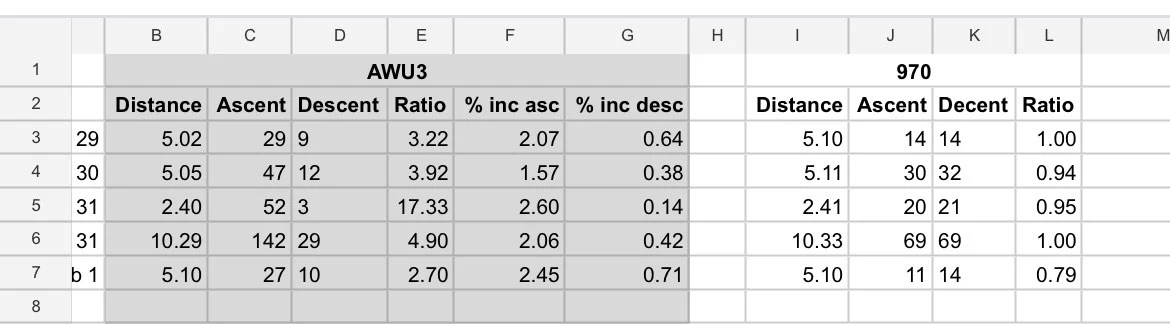
This post is intended to clarify a recurring explanation in this forum that elevation issues with Apple Watch are “Apple’s fault”.
I am using an Apple Watch Ultra 3, which records elevation using a barometric altimeter. The elevation data is accurate and consistent across Apple Fitness and third-party apps.
Most importantly:
The correct barometric elevation data is present in the exported FIT file, verified via WorkoutDoors.
Despite this, Strava consistently discards the elevation data from Apple Watch activities and replaces it with GPS/DEM-based elevation, resulting in significant under-reporting of total ascent.
Example from the same activity:
- Apple Fitness / WorkoutDoors: ~577 m ascent
- FIT file (verified): ~577 m ascent
- Strava after upload: ~480 m ascent
This behavior is consistent across:
- Direct sync from Apple Health
- Manual FIT upload
- Third-party apps (WorkoutDoors, HealthFit, RunGap
Addressing the “Apple’s fault” explanation
The barometric elevation data clearly exists, is consistent, and is exportable. This indicates that the issue is not missing or unusable data from Apple.
Furthermore:
- Third-party apps are able to read and display Apple Watch barometric elevation correctly
- The same FIT file contains correct ascent values before upload
- Strava accepts barometric elevation without modification from Garmin, Suunto and COROS devices
This strongly suggests that the issue is not a limitation of Apple Watch hardware or data availability, but rather a platform-level decision by Strava to ignore or de-prioritize Apple Watch elevation data.
Questions for Strava
- Why is Apple Watch barometric elevation treated differently from other barometric devices?
- Is this behavior based on legacy assumptions from older Apple Watch models?
- Are there plans to update elevation handling now that devices like Apple Watch Ultra 3 provide high-quality barometric data?
- If not, can Strava clearly document this limitation for Apple Watch users?
Apple Watch Ultra has become a serious endurance and trail device. At the moment, Strava systematically under-reports ascent for Apple Watch users despite correct sensor data being available and verifiable.
An official clarification would be appreciated.