Articles written by Strava experts and ethusiasts
Recently active
At Strava, we care deeply about developers, and the health of the developer ecosystem. There are now 241,000 Strava API developers, up from 185,000 last year. At its best, the Strava API allows users to utilize their favorite wearable, developers to build innovative businesses, and users to interact with and build personal tools with their own data. The tech landscape has shifted significantly in recent years, and Strava’s Developer Program must evolve along with it. AI companies are aggressively attempting to scrape platforms for training data, abuse APIs through intermediary layers, and provide zero-code AI tools that produce apps that hammer APIs. We have felt this firsthand - developer applications to our program are up 448% year-to-date, API intermediaries have violated policy terms, and scraping attempts have degraded platform performance for everyone. The serious patterns of abuse that we have identified have caused us to pause and reformat how we assess applications.To our deve
Mythic Maps takes your Strava activities and turns them into stylized, illustrated maps. You connect your account, pick a ride or run, choose a visual style, and we generate a map. Not a filtered overlay on the standard Strava view, but a fully illustrated world built around your GPS route, in styles ranging from Edo-period Japanese ink painting to pixel-art RPGs to holographic tactical displays. Six of our 3D styles applied to real Strava activities. Each style engine is art-directed from scratch around a specific artistic direction.Some styles are 2D, some are 3D, but the 3D ones introduced a specific technical problem very early on: once you tilt the map, camera choice matters as much as the route itself.A random bearing and pitch will often produce a bad result. Terrain can hide part of the line. The route can get pushed too close to the edge of the frame. A long climb can compress into something visually flat. Even when the activity is great, the map can look weak.So for us, 3D
Wandrer is the game you win by exploring new places. The main rule is that you get credit for every road you travel, but only once. In order to progress, you have to go places you've never been before. You can connect your Strava account to Wandrer right now for free and see how much of your town/city/country/continent you've completed. We've only had one country completion so far (Singapore), but maybe you can be the next one to do so (especially if you live in Monaco, Andorra, Liechtenstein, or San Marino). The core functionality of Wandrer is crediting the user with the sections of road that they've completed. Determining these numbers is a subject of a separate post, but for now let's just go with the concept that all of the GPS data from your activities gets boiled down to "completed portions of roads": 0-100% of Main Street, 25-72% of Spring Street, etc. In order to know what portions have been completed, Wandrer must also keep track of the portions of a road that the user hasn't
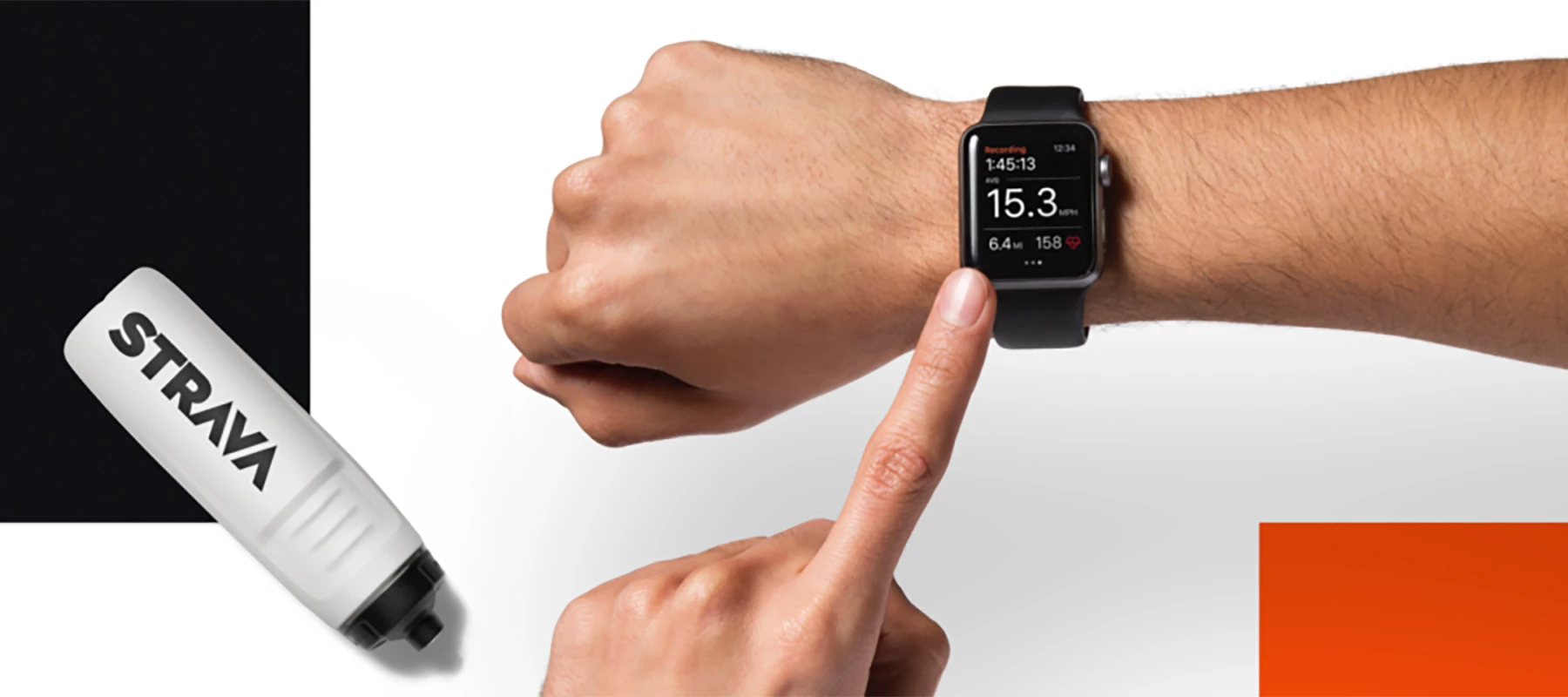
Strava integrates with a wide range of devices and platforms. Today we're going to talk about the Strava/Apple Watch integration and share some commonly asked questions.You can record and upload activities from your Apple Watch to Strava one of two ways: using the Strava watch app or the native Apple Fitness app. With the Strava watch app, activities are synced directly to the Strava mobile app on your phone. Using Apple Fitness, activities are stored in Apple Health and synced to Strava once a connection between the two apps has been established. 3rd party activities (from Zwift, for example) uploaded to Strava can be synced to Apple Health, however 3rd party activities synced to Apple Health will not be available for import to Strava. If you are using the Strava watch app and have a Strava subscription, you will have access to Beacon functionality, which when enabled will automatically send a text to your chosen safety contact during your activity.Frequently Asked Questions:I want t
Greetings! What do backcountry snowboarding and dog ownership have in common you might ask? Both have grown increasingly popular in recent years! I’m here to share some tips for maximizing safety and stoke when venturing into the backcountry with your pup.First, meet Lily! My beloved 5-year-old husky/shepherd mix who loves nothing more than a good romp through the snow. Cold Weather and Long Days Lily’s athletic build and thick fur coat make her well-suited for snowy backcountry adventures. It’s important to make sure that your dog is able to handle cold weather and long days of strenuous exercise. Shorter-haired breeds can benefit from a doggie jacket to help them stay warm in the snow. Train, train, train! This is arguably the most important piece of advice, but it’s imperative that you’ve developed a strong bond with your dog through consistent training. Training your dog to obey voice commands and stay away from the edges of skis/snowboards is crucial to ensuring a sa
Software should be fun. So should your training. Roast My Strava is my attempt to do both.Here’s how I brought AI to the Strava API, and turned it into an app that brings joy to thousands of athletes. The SparkI get my best ideas when I'm running. While looping Central Park or running on the West Side Highway, I often think about what new website or app I could build that every runner and cyclist I pass would actually want to use.I’m also inspired by my favorite creators who've leaned into their own unique expression, like the SWAP podcast or Semi-Rad.Then, last summer, I noticed a trend: people were asking ChatGPT to roast their Instagram. They'd screenshot their profile, paste it into the chat, and wait for the AI to respond.It worked, but it was clunky. You had to grab a screenshot, switch apps, upload the image, and then explain what you wanted. And the result was still pretty generic, because the AI didn't know anything about you beyond that one screenshot.There were two problems:
New to Strava? Welcome! Our mission is to help people live their best active life. Our Getting Started with Strava series is designed to help you get the most of your Strava membership and Subscription. If you've been tracking activities using another App or platform, read on - in this article, we'll provide some tips for importing your historical activity data into your Strava account. The first step is to determine if your activities are located on a platform that you can connect directly to Strava. If they are, some of these integrations are designed so that at least a portion of your previous activities will sync automatically. Some examples of these are Garmin and Apple Health. Visit this link for the complete list of available integrations. If you still have un-synced historical activities after setting up any available integrations, the second step is to see if you can get your activity files in one of
The first line of VeloViewer codeThe first line of VeloViewer code was written in early 2012 after I was introduced to Strava by a cycling club-mate. Strava was a new and exciting platform, and I quickly became obsessed with trying to bag local KoMs. Soon after, I discovered Strava’s API and I couldn’t believe the extent of the dataset that was available. I wanted to refresh my web development skills having spent many years focusing on application development and this was the perfect opportunity. The early days of fighting over local KOMs gave me the idea to build a fully filterable list of all my Strava segments and their current positions so that I could easily see how many podiums, top 10’s, top 50’s I had. My club-mates soon wanted access and before long, word spread via various cycling forums - including a very keen group of Norwegian cyclists who were early adopters. I undertook the first of many rewrites of the core syncing process due to the growing demand. Right from the sta
Best Efforts are a cool way to track your progress and they allow you to see which portion of an activity was the fastest at certain distances. Best Efforts tracks your top three all-time efforts and top five annual efforts at each distance, as well as your fastest efforts from each run. Follow your progress at benchmark running distances from 400 meters to 50k with Best Efforts. How to access the feature:Mobile: Visit your profile page on the mobile app and scroll down to “Best Efforts.”Here you will find your top efforts for the distances that you have completed. At the top, toggle between distances to view the Best Efforts. You can tap into “View Analysis” to see more details on your progress at the given distance.You can also find your Best Efforts on an activity by going to the "My Results" page of an activity. Website: On your web profile page, look for "my stats" on the right side of the page, select the "run" icon, and you'll see your Best Efforts listed. Visit a specific act
If you haven’t heard, Best Efforts are now available for your Ride activities. Best Efforts compiles a Strava user’s top all-time performances and their top five performances per year in each category except power, where it shows your power curve. This new feature is available on both web and mobile. Performances are tracked automatically with GPS and power data from your cycling activities. A power meter is required to collect power data. Virtual rides are not included in Best Efforts except for power data. What to Know: Riding Best Efforts will track four categories. Longest ride: Tracks longest rides by distance. Elevation: Tracks performance in two elevation categories: Biggest Climb - vertical gain on individual climbs, and Elevation Gain - vertical gain from the entire ride. Distance: Tracks fastest performances at 5 miles, 10k, 10 miles, 20k, 30k, 40k, 50k, 80k, 50 miles, 90k, 100k, 100 miles and 180k Power: Tracks top performances for average power over 5 s
Hello Everyone,Welcome to our Devices Integration Spotlight Series. We wanted to put together a series of articles that revolve around the popular devices that are integratable with Strava. In this series, we will cover how to use the integration, frequently asked questions, common issues that may be experienced, and troubleshooting steps/workarounds that can be used to resolve those problems. Let’s kick things off with Apple Watch.Apple Watch and Strava IntegrationCurrently, there are two different methods of recording and syncing activities in Apple Watch to Strava. Apple Health Strava app for Apple Watch OSRecording using the Apple Watch native workout app (Apple Health) and Syncing Activities with Strava.For Activities that are recorded using Apple Health you can sync those to Strava using our Apple Health integration Linking Accounts On the mobile app, open your settings from the gear icon in the upper corner of the You tab. Select Manage Apps and Devices > Health > Select t
A lot of Strava users know how to adjust the privacy of an activity, but did you know you can adjust the privacy of all of your past activities at once? We recognize that people don’t want to be locked into privacy decisions, so we built in options. Your activities privacy control can be adjusted on a default, individual, and even bulk basis. The same goes for hiding your heart rate on activities. Change your mind? We have you covered!You can make a bulk change to the activity or heart rate visibility on all of your past activities from your privacy controls page. Web: Settings > Privacy Controls > Edit Past Activities > Choose from Activity or Heart Rate visibilityMobile: You > Settings > Privacy Controls > Edit Past Activities > Choose from Activity or Heart Rate visibilityFollow the on-screen prompts to complete the process of bulk adjusting the visibility on your activities. Helpful TipsThere is no way to reverse or undo this change after you’ve completed thi
Want to let your loved one know where you are when you go out for a solo activity? Exploring a new route and don’t want friends or family to worry? If so, check out Strava Beacon...our live location sharing feature available to everyone. Beacon was built to give athletes more control over their own safety, and to keep them connected to their community when they need it most. You don't have a subscription? No worries, Beacon is available to all when you share using the Strava app on your phone. You can select up to 3 contacts keep track of where you are, in real time. Your location should update about every 15 seconds, depending on cell service. Your friend doesn't use Strava? Not a problem; the person following you does not have to have Strava on their phone to follow you. As long as the recipient of your text message has access to a web browser they will be able to see your activity. Please note that Beacon sharing from connected devices including Apple Watch and
Hello! My name is Geode and I am a member of Strava’s Community Management team specializing in account access inquiries. This is the second of two parts of my Account Access series. In Account Access Series, Part 1: Log In, we worked on troubleshooting basic issues like password reset, email update, and locating the email address associated with the account. Now in Part 2, we are going to traverse the bumpy trail of duplicate account issues, so get those trekking poles out!Note: Start with Step 1 below to diagnose the issue you are experiencing. Then go to Step 2, the recommended section to troubleshoot the diagnosed issue. Most likely all the information needed to resolve the issue you are experiencing is included in this article. Let’s get started! 01 DiagnoseWe first need to correctly identify the root cause of the issue you are experiencing. Below are the most common locate or merge account issue descriptions I hear from athletes. Based on the description, I usually know which dir
Want to send a message to a friend on Strava? Maybe have a group conversation? How about sharing an Activity and/or Route? Now you can! SENDING A MESSAGE: You can message a friends or create a group message for you and other members. Messages can be sent to Strava athletes who follow you but you may not be able to message another athlete depending on their privacy controls.-Tap the Message button on the profile of the athlete you wish to message -Tap the speech bubble icon from the Home and Groups tab. Tap the pencil icon in the upper right to choose from a list of athletes that follow you. VIEWING MESSAGES:To access messages and invitations you’ve received, click the speech bubble icon found on the Home and Groups tabs in the Strava mobile app.Note: Messaging is available via the mobile app; it is not presently available on the Strava website.SETTINGS: You can control certain aspects of individual chats by opening the chat &
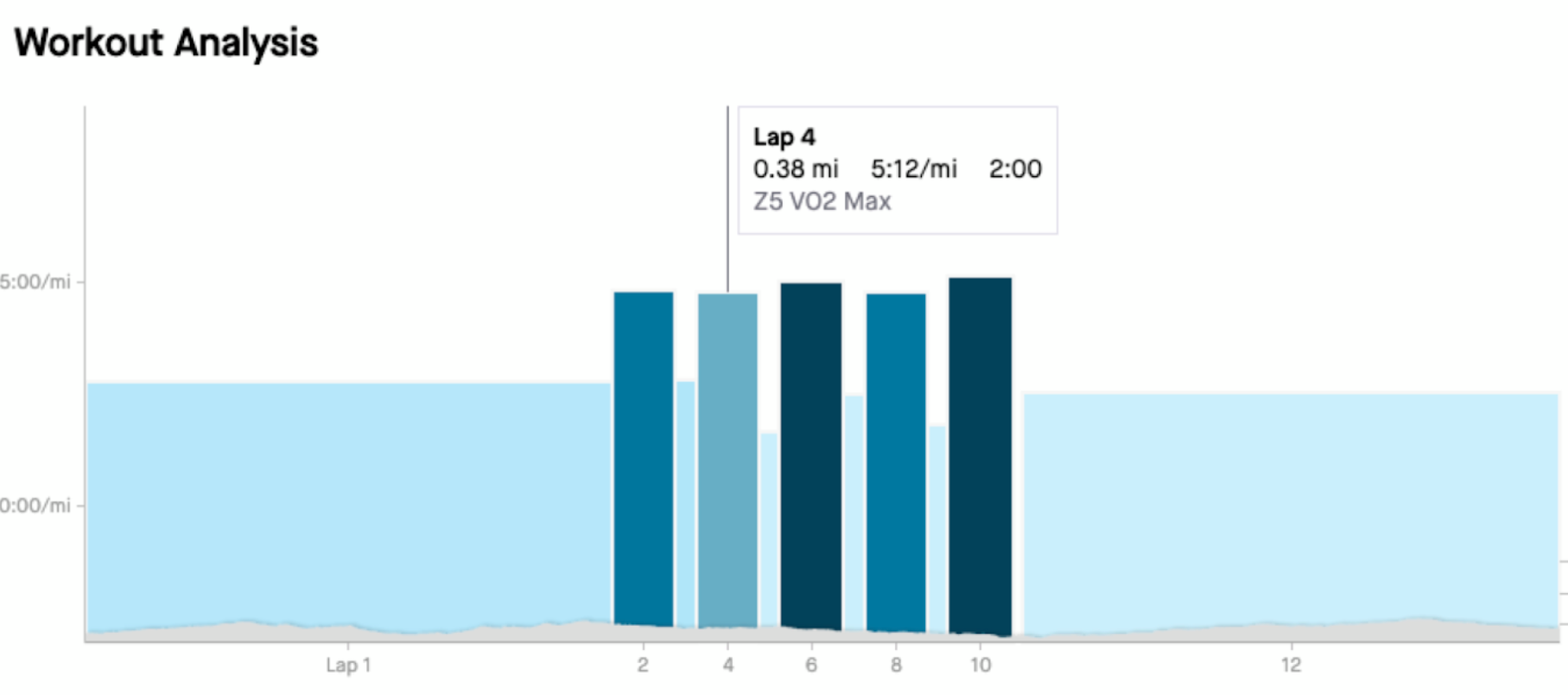
Running Workout Analysis GuideThe Workout Analysis screen provides you with a thorough breakdown of your activity’s lap data. You can view each individual lap’s stats including pace zone, average pace, distance, time, and heart rate.To take full advantage of the Workout Analysis, your activity must be tagged as a “workout” and your device must be capable of recording laps. You need at least two laps in your activity for the Workout Analysis to display.Two important notes here:Our mobile app does not allow you to create laps in your activity. This feature will not work for the auto-generated mile or kilometer splits Strava creates on your activity. Let’s quickly talk about Splits vs Laps.SplitsSplit times are calculated using moving time on run activities loaded to Strava. This calculation happens during the upload process and is not related to any laps your device has recorded. The splits will default to miles or kilometers based on your preferred measurement. You don’t need to take a
Celebrating Our Hub Superusers: Meet @VikKToday, we’re excited to continue our series highlighting some of the incredible individuals behind that spirit and behind the Strava Community Hub: our Community Hub Superusers.In this spotlight, we’re proud to introduce @VikK, a dedicated runner from the UK who brings extensive experience, a love for exploration, and a passion for helping others to the Strava Community Hub. Whether he’s sharing insights, troubleshooting issues, or encouraging fellow athletes, his presence helps make the Hub a welcoming space for athletes everywhere to connect, learn, and grow.Tell us a little about yourself!I'm based on the edge of southeast London in the UK, which means I'm super close to the countryside, the coast, and loads of hilly terrain – plenty of options for exploring!These days, I run four days a week, mostly at a super slow pace to stay injury-free. I like to vary my routes so it's not always the same, and I'm currently working on a few challenges
Hi there! I’m Bryant, and I’m part of the Strava Community Hub Team.My role involves keeping the Hub a great place for athletes to connect, ask questions, and share experiences, and a key part of that is actively moderating the community to keep it welcoming and informative. 🏃♂️ My Strava Story 🏀I first started using Strava in the beginning of 2021. I mainly play basketball so I always use Strava to help track my conditioning. Whether its playing pickup games or dribbling the basketball up hills, I use the data to see how long I can go without a break.What keeps me motivated to move is pushing myself to be better than I was before my achilles injury in late 2023. Although this is difficult to comeback from, I know Greatness is built from tough times instead of easy ones. Nothing can pull me away from the court! 💬 What I Do in the Community HubI wear a few hats when it comes to the Community Hub. This includes helping answer questions, merging posts, checking up and providing update
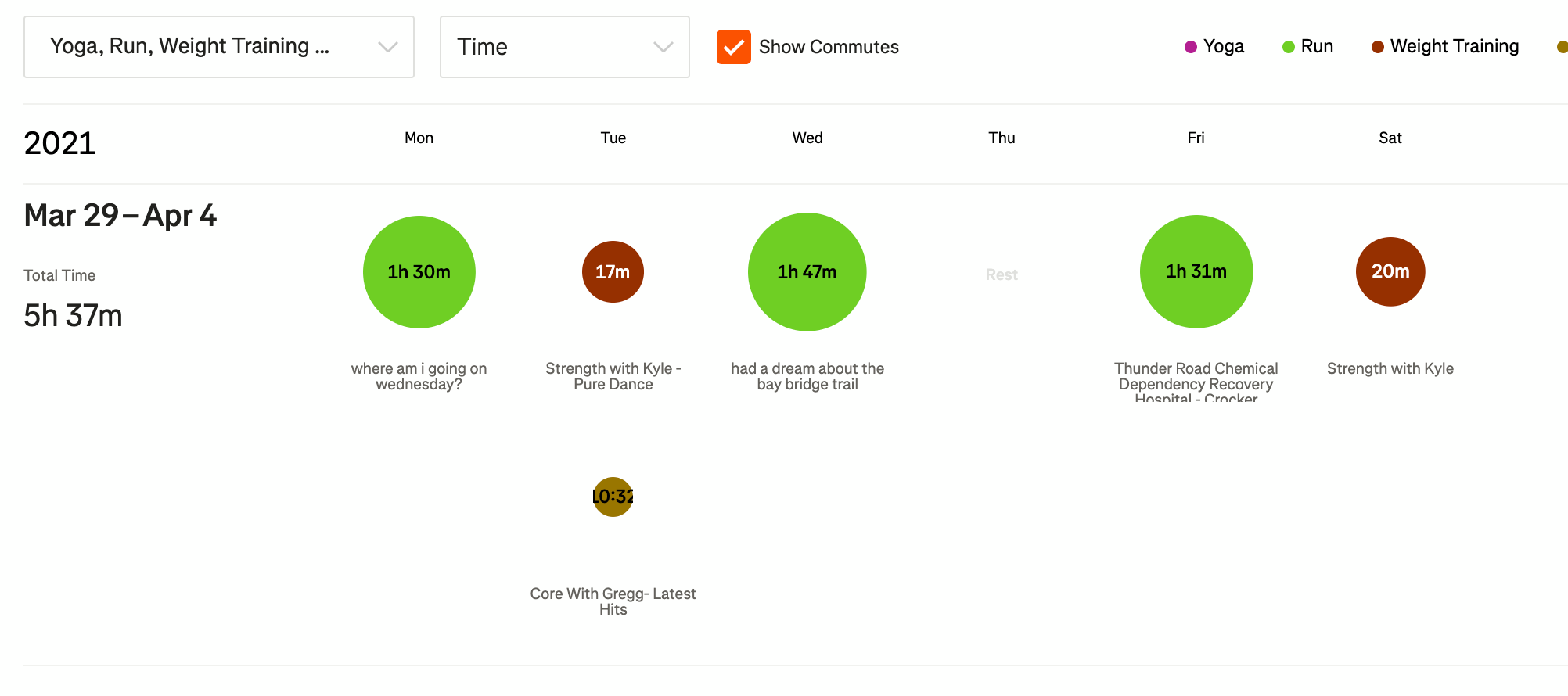
Do you enjoy analyzing your Strava data? If so, check out the Training Log! Strava subscribers can access the Training Log to view all of your training in one place, it's visualized to show your progress and highlight important stats. We’ll update your Training Log every time you upload an activity.How to access the feature:Mobile: Strava App > You Tab > Progress > Scroll Down > Training LogWeb: Strava.com > Training Tab > Training Log 01 Hi Training Log, Have We Met? The Training Log was a feature I rarely used 😞 Prior to the previous year, my uploads to Strava were fairly simple:Run three or four days out of the week 1 or 2 Strength Training WorkoutsBasic stuff right? 🤔 🤔I uploaded only two activity types. This made me feel like I didn’t need to check out my Training Log at all 🙊. If I was to look at my Training Log, it looked the same the entire year and it was fairly simple 😴. Here is a screenshot below of how it used to look: Web Screenshot 📸: Mobile Sc
Hey everyone! 👋Here’s your regular roundup of what’s been happening around the Community Hub in the last couple of weeks. Whether you’ve been head-down or just checking in, we’ve got the highlights for you! Check them out below Discussions🏃♀️ Hormonal contraception - running performance@Rolio sparked a great convo on how hormonal contraceptives may affect running. Members shared personal experiences and research, highlighting the need for more discussion and study on this topic. Helpful answers🔋 Merging Activities & Keeping Power Data@TijR asked about merging activities without losing power data. Fellow users like @arc88 chimed in with tips: using FIT or TCX files seems to be the best way to keep everything intact. ⏳ Stuck on “Processing Activity”?A few users, including @abrahammoncherry , had runs stuck on the “processing” screen. Looked like a short-term issue on Strava’s end, which is now cleared up and syncing is back to normal. ♾️ Are Samsung laps supposed to Sy
As many of you know, if you want to be the King of the Mountain (KOM), Queen of the Mountain (QOM), or Course Record (CR) holder, you have to have the fastest time on a segment. If you feel that achieving a CR, or QOM/KOM on Strava isn’t in your future but still want to compete in local segments, Local Legends (LCL) is for you! Launched in 2020, Local Legends is Strava’s way to reward dedication. Rewarded to the person that has traveled a particular segment the most times in a rolling 90 day window, you can become the LCL regardless of your pace or speed recorded on the segment. For those who become a Local Legend, a "Laurel" crown iconwill show next to the segment on your activity page as well as on the segment details page. To earn the Local Legend achievement, you must match to the segment more times than any other athlete in the past 90 days. Some things to note: Efforts older than 90 days will be removed from the overall effort count. Only activities visible to “
Exploration of the outdoors lives at the heart of trail activity. Every hike, mountain bike ride, or trail run offers the prospect of an evolving landscape. Depending on the day, the same route may offer snow-dusted spruce trees, wildflowers peaking through a field, or wispy clouds painting the sky. Strava offers Trail Routes to help act as your guidebook to local trail offerings. I’m hoping that you’ll find this community post helpful in planning your next outing! The clearest way into the Universe is through a forest wilderness. -John Muir How to access the feature Mobile: Maps > Routes > Select one of the trail sports listed below Web: Dashboard > My Routes > Create New Route > Routing Preferences > Select one of the trail sports listed below. Note: Trail Routes are currently available for the following activity types: Hike, Walk, Trail Run, Mountain Bike Ride, and Gravel Ride In addition, while the Strava website does
Hello! I’m Kimberly, and I’m part of the Strava Community Hub Team!I help make sure the Hub stays welcoming, informative, and a great place for athletes to connect, ask questions, and share their experiences. My Strava StoryI started using Strava a few months before I started working here in 2022. I used it to track simple walks and bike rides. Over the past couple of years I have branched out and now use Strava any time I’m being active. I don’t do races or compete competitively, but I do it for the community, which Strava has made that much more fun! You can find me hiking, biking, running, paddleboarding, fishing, and playing pickleball, all around Colorado!Girl fishing in lake from beach with dog playing near her💬 What I Do in the Community HubI’m here to help answer questions, surface helpful content, and keep things running smoothly behind the scenes. You might see me publishing articles, merging posts, tagging Known Issues, or highlighting great answers from fellow athletes. ❤
Strava is more than just a place to track miles or chase personal bests; it’s a vibrant community powered by athletes who uplift and support one another. Today, we’re excited to kick off a new series highlighting some of the incredible individuals behind that spirit and behind the Strava Community Hub: our Community Hub Superusers.In this first spotlight, we’re proud to introduce @Jana_S , a passionate runner from the Czech Republic who brings energy, empathy, and expertise to the Strava Community Hub. Whether she’s sharing tips, answering questions, or encouraging others, her presence helps make the Hub a welcoming space for athletes everywhere to connect, learn, and grow.Tell us a little about yourself!I’m based in Czech Republic (Central Europe). I’m a hobby runner—I only started in my 40s, but it’s become a great way to unwind and discover what my body is actually capable of. The great thing about starting later in life? All your PRs are still ahead of you! When did you first star
Weightlifting + HIIT + Strength Training + Stationary Bike + Pilates + Yoga + Rebound + Rowing + VR Fitness + CrossFit + Circuit Training + Rock Climbing + Stair Climber + Jump Rope + Kickboxing + Online Programs + Obstacle Fitness + Zumba + Treadmill As you can see from the list above, there’s a wide variety of ways to get active indoors. Chances are you’ve tried one of these out, but did you record it? If not, why? In this blog, we'll teach you how to use devices you likely already own (your smartwatch or mobile phone) to record indoor workouts. We'll walk you through how to upload these activities to Strava so that you can benefit from tracking trends and progress over time. I don’t have a fancy device to record indoor workoutsYou don’t need an expensive fitness device to record your indoor
Already have an account? Login
Enter your E-mail address. We'll send you an e-mail with instructions to reset your password.