

Answered

loss of activity - recovery

  • May 3, 2025
  • 3 replies
  • 873 views

Forum|alt.badge.img

Hello,

I recently finished the London marathon with the activity recording on my Apple Watch. 
 

My watch was running low on battery, but I managed to finish the race with some battery left. I completed it on my watch and got the usual readout of statistics. However following this my watch ran out of battery and I don’t think it uploaded onto my actual account as it is not showing up on my Strava account. Is there any way of recovering saved runs which haven’t been uploaded? Thanks 
Best answer by Jana_S

Hi ​@henryconchie, were you recording with the Strava app in your AW, or with the native Apple Workout app which you would sync to Strava afterwards?

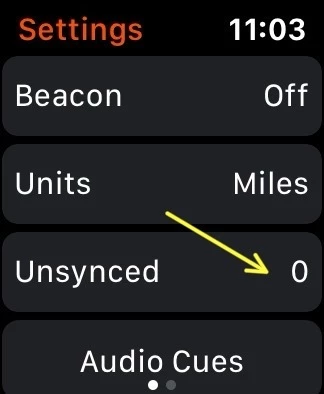
If it's the Strava app, to to Settings and check if there's any unsynced activities (tap that to see the option to sync):


If you recorded via the Workout app, unfortunately there's a bug in Strava which affects syncing of longer activities (a marathon would be a typical example). If that's the case, you would need to sync it via some 3rd party app such as RunGap. 

3 replies

Jana_S
Forum|alt.badge.img+29
  • Hub Superuser Alumni
  • Answer
  • May 3, 2025

Hi ​@henryconchie, were you recording with the Strava app in your AW, or with the native Apple Workout app which you would sync to Strava afterwards?

If it's the Strava app, to to Settings and check if there's any unsynced activities (tap that to see the option to sync):


If you recorded via the Workout app, unfortunately there's a bug in Strava which affects syncing of longer activities (a marathon would be a typical example). If that's the case, you would need to sync it via some 3rd party app such as RunGap. 


Forum|alt.badge.img
  • Hub Starter
  • December 29, 2025

Hi, 

similar thing happened to me yesterday. I was recording via Workout app on my AW, it was a downhill skiing workout (ca. 5hrs) and the watch died at the end of the activity (probably froze). While I can see the workout in the fitness app, I see 0 unsynced and am not able to push it in any way I found on google. 
 

Was the bug resolved or is there any way of recovering/pushing it? I do not want to use any 3rd party software. 


Jana_S
Forum|alt.badge.img+29
  • Hub Superuser Alumni
  • December 29, 2025

Hi, 

similar thing happened to me yesterday. I was recording via Workout app on my AW, it was a downhill skiing workout (ca. 5hrs) and the watch died at the end of the activity (probably froze). While I can see the workout in the fitness app, I see 0 unsynced and am not able to push it in any way I found on google. 
 

Was the bug resolved or is there any way of recovering/pushing it? I do not want to use any 3rd party software. 

If you record via the Workout app, it won't be in the Unsynced activities in Strava, simply because there's no way it would get there 🙂 you need to sync it from Apple Health. In your iPhone Strava app, go to tab You > tap the gear wheel in top right to open Settings > Manage apps and devices > Health. This should show last 90 days of activities, synced with a checkmark, unsynced with an option to import. Tap the activity you want to import and wait for the checkmark to appear at it, then go back to your list of activities, and it should be there.


