Answered

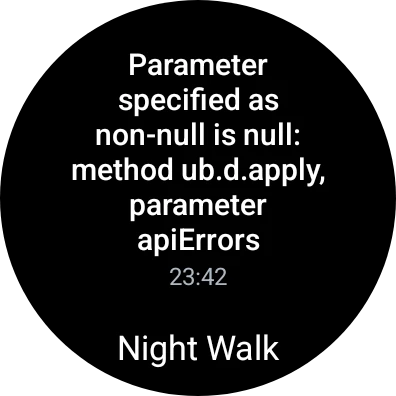
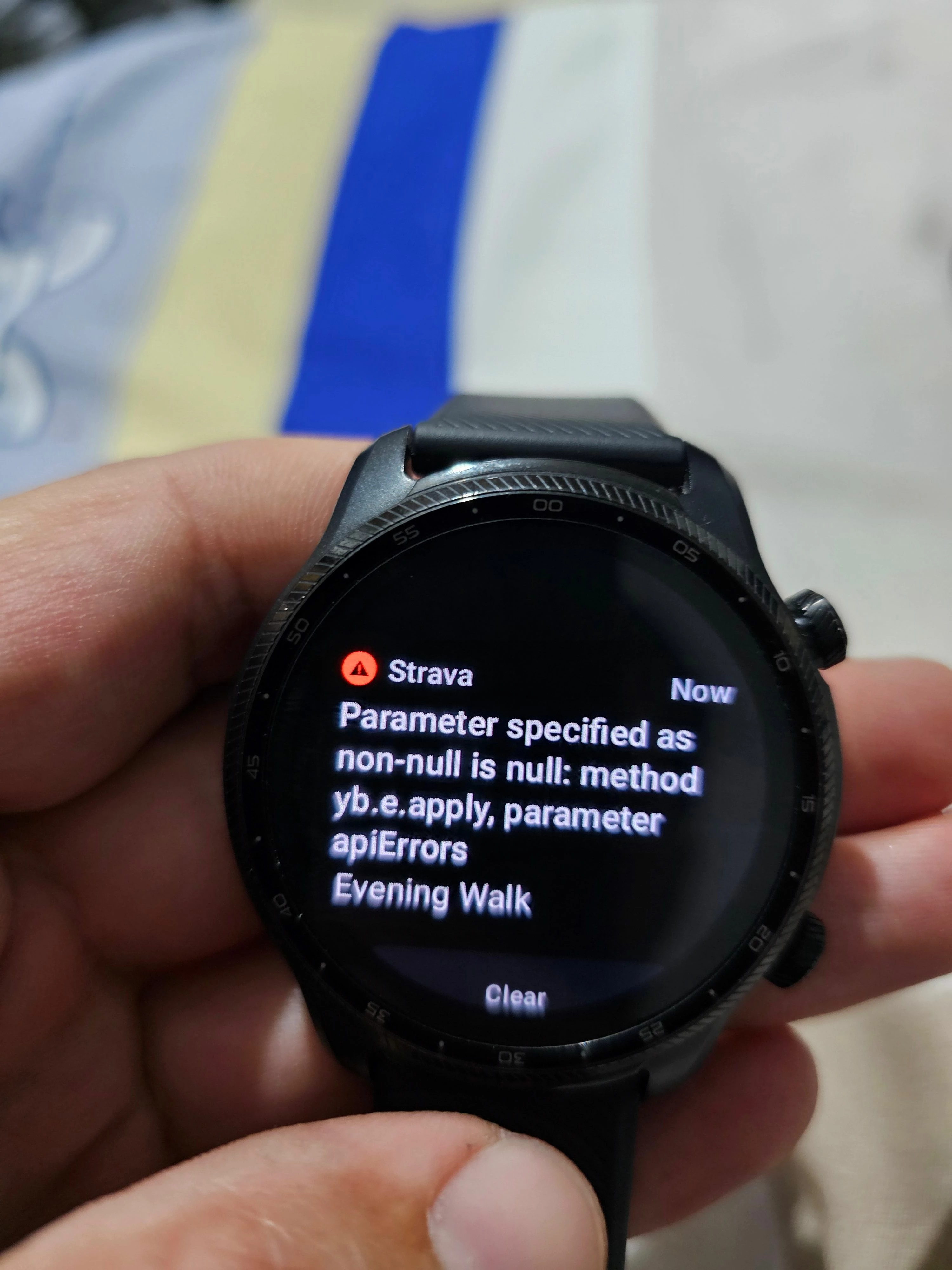
(RESOLVED) Error message (non-null is null) when attempting to sync activities on Wear OS app

  • April 2, 2024
  • 136 replies
  • 125 views

Show first post

136 replies

Scout
Forum|alt.badge.img+28
  • Strava Alumni
  • April 8, 2024

Hi All, 
Sorry for the continued trouble. Our team has noted that the following may resolve the issue; please give this a try: 

  1. Ensure that your Watch and Strava app on the watch are up to date
     
  2. Restart your Watch, and your phone, if attempting to sync through bluetooth
     
  3. Make sure your phone and watch have more than 25 percent battery life.
     
  4. Make sure your watch does not have any modes on that restrict syncing:

    First, make sure your watch doesn't have Power saving, Airplane mode, or Watch only mode turned on. These modes restrict features that are required to sync data.

    Here's how to turn off these different settings:

    - Power saving mode: Swipe down from the top of the screen, and then tap the Power saving icon - it looks like a battery. Then, make sure the watch does not have a Power saving mode turned on.

    - Airplane mode: Swipe down from the top of the screen, and then swipe to and tap the Airplane icon.

    - Watch only mode: From Settings, swipe to and tap Battery, then tap Power mode, and then choose Standard. On the Galaxy Watch, press and hold the Power key to turn off the watch, and then press and hold the Power key again to turn it back on.
     
  5. Make sure your phone and watch are connected through Bluetooth or your watch is connected to a strong wifi signal.

If this fails to push over the pending uploads then the app will need to be uninstalled/reinstalled and the activities will be lost as they are unable to be manually extracted from the device.


Forum|alt.badge.img+3
  • Hub Starter
  • April 8, 2024

Scout,

Only thing I'm seeing working is waiting like 6 hours. I've tried everything you've outlined above, unfortunately something is wrong with Strava and it's connectivity to smart watches. I see Garmin has no problems with uploads. Hopefully Strava will come out with a patch fix soon.


Forum|alt.badge.img+3
  • Hub Starter
  • April 8, 2024

Same, may just switch to my Garmin. Looks like that doesn't have any issue uploading or syncing.


Forum|alt.badge.img+2
  • Hub Starter
  • April 8, 2024

Issue was fixed via the suggested option (turning on and off both smartphone and watch) but had the same issue with my next run.

Also, as the app on the watch tries to sunc continuously, it is draining the battery life.

Please provide a sustainable solution.


Forum|alt.badge.img+2
  • Hub Starter
  • April 8, 2024

I just left my phone and watch on charge overnight and if any update was needed it happened and my watch resynced perfect today, thank you


Forum|alt.badge.img+1
  • Hub Starter
  • April 8, 2024

Same issue as rest; Galaxy watch 5 / Samsung S21 Ultra. Also noticed that it synced approx half a day later. Suggested steps by mod haven't worked :(. Fingers crossed for a fix soon ! 


Forum|alt.badge.img
  • Hub Starter
  • April 8, 2024

This is still not sorted. I'm still having problems after a week 


Forum|alt.badge.img+5
  • Hub Starter
  • April 8, 2024

As others have said, it eventually syncs the next day, sometimes hours after the activity.  Hopefully we get a real fix soon.  With the current instructions that you provided, will uninstalling/reinstalling the app on our watch cause past activities to be erased?  Or will only activities that have not been synced get erased?  


Forum|alt.badge.img

Smart Watch Classic 4 not working with Samsung A54.


Damm


Forum|alt.badge.img
  • Hub Starter
  • April 8, 2024

Same for me as other posters using Samsung Galaxy Watch 4 to Pixel 7a.  
All steps below followed, and paused VPN on my phone while attempting to resolve.  Samsung Health from watch to phone is syncing though, so definitely a Strava app issue.  And as other's have mentioned, the constant unsuccessful attempts to sync are draining watch batter.
Why don't you wind the watch app back to a couple of versions ago, and properly beta test updates before releasing them?

Willow,  Australia


Forum|alt.badge.img+1
  • Hub Starter
  • April 9, 2024

After a race, I got the same error. It was so frustrating because I PR and I couldn't see the full stats. After 8 hours, I hit the unsynced on the Strava app on the watch, it finally synced. 


Forum|alt.badge.img+1

Same issue here, I got the Null-parameter erro message and was unable to sync my run with the app. Pressing the sync button didn't do anything. Restarting the app, watch and smartphone app didn't do anything too. Got it resolved this morning by disabling the bluetooth on my phone en enabling it again.

Galaxy Watch 4 44mm and Pixel 6, both running all the latest updates


Bikerrebel
Forum|alt.badge.img+5
  • Hub Starter
  • April 9, 2024

Hi Scout,

I've tried the following:

  1. Strava apps are up to date
  2. The watch and phone have been restarted, several times 
  3. I reinstalled the apps on both my phone and my watch, it still gave the same result
  4. Both were fully charged while trying
  5. No restricting modes were activated
  6. Both had a good Bluetooth connection and a strong WIFI signal
  7. After trying an entire evening to sync I let it go until the next morning. Then after pressing the manual sync button on my watch once again it somehow synced. This happened twice during the last week. During the second time, I waited and checked if it would sync after midnight, but it still would only sync after a couple of hours.

    I hope this information helps solve the issue.

Forum|alt.badge.img+3
  • Hub Starter
  • April 9, 2024

Mine synced the next day - I didn't change anything to fix it though.


Forum|alt.badge.img+1
  • Hub Starter
  • April 9, 2024

Same problem here with Samsung Galaxy Watch 6 and Samsung Galaxy S22...


Forum|alt.badge.img+3
  • Hub Starter
  • April 9, 2024

Dit is geen oplossing. Nu al dagen problemen. Het is niet meer leuk. Ben mooie activiteiten kwijt. Teleurgesteld in Strava!


Forum|alt.badge.img+3
  • Hub Starter
  • April 9, 2024

Hier hetzelfde probleem!


Forum|alt.badge.img+2
  • Hub Starter
  • April 9, 2024

Same issue with Galaxy Watch 4 and Samsung Note 10+.  Samsung pushed an update on the Galaxy watch a few weeks ago, and ever since then, it's like the Strava app is absolutely unable to sync.  How hard can it be to sync data between a phone and a watch?? I'm paying premium membership for what here?


Forum|alt.badge.img+2


Hi, i solved the issue! 

Using samsung galaxy watch with samsung galaxy s22. I couldn't have resynced.

1. Try to restart both phone and your watch, and the error should dissalear.

2. Then wait overnight and resync - it should.

3. Uninstall application from both if your devices and reinstall them.

4. Resyncing shoukd work now right away.


(if you uninstall without syncing you will loose data. Thats why I'd try steps 1-2, before reinstalling)

I hope it will work for you! 


Forum|alt.badge.img+3
  • Hub Starter
  • April 10, 2024

Same issue with Samsung watch 6 & Asus zenfone 8. I have 2 activates backed up both showing the same error. I have reset both phone and watch to no effect.  


Forum|alt.badge.img+2
  • Hub Starter
  • April 10, 2024

I get the error on the Pixel Watch 2 (Strava App version 1.39, build 78101). The exact error message is this: 

Parameter specified as non-null is null: method yb.e.apply, para... [can't read the rest]

Forum|alt.badge.img+3
  • Hub Starter
  • April 10, 2024

+1 here now. Synced fine on Monday after run - now roll on to Wednesday it's not syncing at all. Is this bug getting fixed sometime as it's widespread?


Forum|alt.badge.img+6
  • Hub Starter
  • April 10, 2024

Sometimes it works and now last 2 days again no sync. 

There was an update in the google store but didn't solve the issue


Forum|alt.badge.img+3
  • Hub Starter
  • April 10, 2024

After today update, still can't sync my data from my watch. Disapointed how long takes to resolve this.


Forum|alt.badge.img+3
  • Hub Starter
  • April 10, 2024

I am getting the same issue with WearOs (Mobvoi Ticwatch Pro 3 ultra) - sometimes later for no apparent reason the update will complete.