Answered

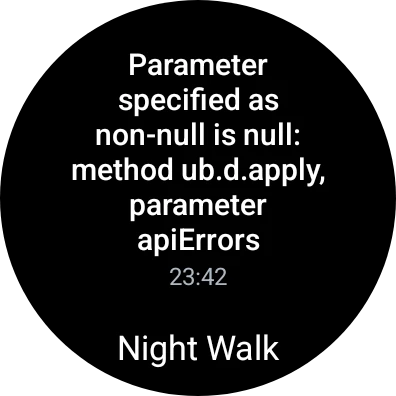
(RESOLVED) Error message (non-null is null) when attempting to sync activities on Wear OS app

  • April 2, 2024
  • 136 replies
  • 125 views

Show first post

136 replies

Forum|alt.badge.img+2
  • Hub Starter
  • April 10, 2024

Hello,

Power mode / airplane mode / watch only mode were not activated. 

Power % was over 25 for both watch and phone.

Both watch and phone are updated, in fact there were no issues before the latest Samsung update to the Galaxy 4.

I rebooted both phone and watch, and I even uninstalled both apps.

The problem persisted. Last bike run only synced on its own after 4 hours - completely random. I've lost two activities in the past week because they would just not sync.


Forum|alt.badge.img+5
  • Hub Starter
  • April 10, 2024

Come on Strava.  Surely you have a team of intelligent engineers.  You can do better than making us wait this long.  Take us back to an old version before this started until you work out the bug.  Or give us a refund while we wait.  Thank you.  


Forum|alt.badge.img+2
  • Hub Starter
  • April 11, 2024

Am also getting the same error 


Forum|alt.badge.img+6
  • Hub Starter
  • April 11, 2024

Got sync this morning 


Forum|alt.badge.img+3
  • Hub Starter
  • April 11, 2024

I found a fix:

Open strava on watch, sign out, and sign back in and it should ask you to grant it permission again. This fixed the sync issue for me.


Forum|alt.badge.img+3
  • Hub Starter
  • April 11, 2024

I found a FIX:

Open strava on watch, sign out, and sign back in and it should ask you to grant it permission again.

This fixed the sync issue for me.

Note: No activities were lost. I was able to sync on login. This was on Galaxy watch 5 pro. 


Forum|alt.badge.img+1
  • Hub Starter
  • April 11, 2024

Google security certificates playing havoc?


Forum|alt.badge.img+1
  • Hub Starter
  • April 11, 2024

I'm having the same issue as well. Seems at random when the sync does go through. The fixes proposed by the Strava team do nothing for me sadly.

Seems this issue has been existing for more than a week now, this issue can be fixed by now surely.


Forum|alt.badge.img+2
  • Hub Starter
  • April 11, 2024

Same, Galaxy Watch 6 - `parameter specified as non-null is null method yb.e.apply, parameter apierrors`


Forum|alt.badge.img+2
  • Hub Starter
  • April 11, 2024

Not working here.


Forum|alt.badge.img+2
  • Hub Starter
  • April 11, 2024

Thank you very much, this solved the issue for me too. Thanks for sharing.


Forum|alt.badge.img+2
  • Hub Starter
  • April 11, 2024

Still no fix? **bleep**, I have 5 exercises waiting to be uploaded.
Get your **bleep** together.


Forum|alt.badge.img+2
  • Hub Starter
  • April 11, 2024

Does this delete activities that are waiting for sync, do you know?


Forum|alt.badge.img+2
  • Hub Starter
  • April 11, 2024

Same problem here. Of course it had to be a PR too... let's go strava, you have been mostly flawless for years.  Why now? What changed? 


Forum|alt.badge.img+1

I got the same problem!! Which is the solution? 


Forum|alt.badge.img+2
  • Hub Starter
  • April 11, 2024

Same here, I've just encountered the issue. So disappointed!


Forum|alt.badge.img+1
  • Hub Starter
  • April 11, 2024

Thanks for the fix! Definitely worked without any data loss!


Scout
Forum|alt.badge.img+28
  • Strava Alumni
  • Answer
  • April 11, 2024

Hi All 👋!
Thanks for your patience and sorry about the issues.

You can try the steps @TheFostah noted which resolved the issue without losing any data:

Open Strava on watch, sign out, and sign back in and it should ask you to grant it permission again.

If this doesn't work for you, our team has pushed a fix and you will need to do the following:

1. delete the Strava application from your watch
2. Power your device off for 10 seconds
3. turn your watch back on and reinstall the Strava application (v1.39).

Unfortunately, this will discard any pending activities that have not yet synced to your account but will remove the error and new activities should sync over again. If you have issues after doing the above, 
please submit a support ticket. If you have trouble with our online form, you can send an email to support@strava.zendesk.com. Please direct your email to the attention of Jimi. 


Forum|alt.badge.img+5
  • Hub Starter
  • April 11, 2024

I have followed the instructions.  1) Deleted the app from my Samsung 6 watch.  2) Waited 10 seconds.  3) Reinstalled the app on my watch.  4) Attempted to open the app on my watch.  It says "Sign In on Phone."  When I touch this button, it gives me the following message:  "Looks like we encountered an error signing you in."  I then uninstalled/reinstalled the app on my phone.  I still get the same message on my watch.  I cannot open the app on my watch.  Please help.  


Forum|alt.badge.img+2
  • Hub Starter
  • April 11, 2024

Honestly? For me it was my longest run ever and now it has to be discarded? There's no different approach to this? Really feeling reluctant to removing the application...


Forum|alt.badge.img+5
  • Hub Starter
  • April 11, 2024

Also, your "Submit a Request" feature doesnt even work on the website using my desktop.  When I click on Submit a Request, it opens a useless chat box and asks you to type a question.  Anyone else having the same issue?  


Forum|alt.badge.img+2
  • Hub Starter
  • April 11, 2024

I can now confirm this works! It did successfully sync my unsynced activity, too, no data lost!

Log out (on the watch) and log back in (on the phone). You may need to do this more than once.


Scout
Forum|alt.badge.img+28
  • Strava Alumni
  • April 11, 2024

Hey @broshwag
If you are having any issues, you can send an email to: support@strava.zendesk.com


Scout
Forum|alt.badge.img+28
  • Strava Alumni
  • April 11, 2024

Hey @broshwag
I talked to our team and they you will need to make sure that the watch is connected to your phone.
And then ensure that you are logged into the Strava app on that phone and preferably connected to wifi.
If you still have issues, send an email to support@strava.zendesk.com and direct it to the attention of Jimi. 


Forum|alt.badge.img+3
  • Hub Starter
  • April 11, 2024

I found a FIX:

Open strava on watch, sign out, and sign back in and it should ask you to grant it permission again.

This fixed the sync issue for me.

Note: No activities were lost. I was able to sync on login. This was on Galaxy watch 5 pro.