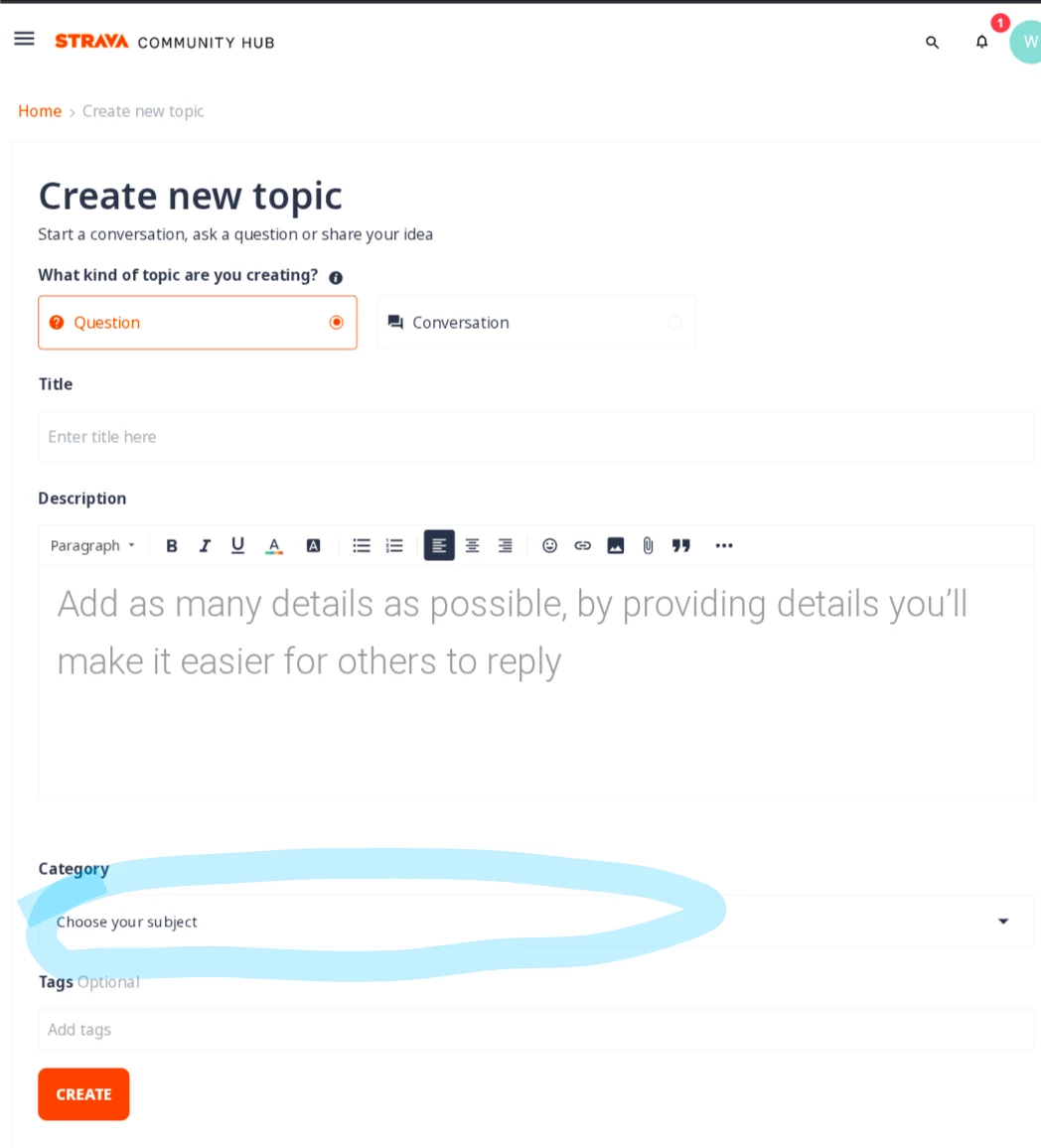

How To: Create a Post, Find and Upvote Content

  • March 19, 2025
  • 23 replies
  • 307 views

Lola
Forum|alt.badge.img+26

1. How to Create a Post

  1. Log In: Ensure you're logged into your Strava Community Hub account.​
  2. Start a New Topic:
    • Click on the "+ Create a Topic" button located at the upper right corner.​
    • Select the type of post:​
      • Question: For inquiries seeking answers.
      • Conversation: For open discussions.
      • Idea: To suggest new features or improvements.
  3. Compose Your Post:
    • Title: Provide a clear and concise title.​
    • Description: Detail your content, including relevant information or questions.​
    • Category: Confirm the correct category is selected.​
    • Tags: Add relevant tags to increase visibility.​
  4. Submit: After reviewing, click "Create" to publish your post.​

​For more details, refer to Strava's Community Guide to Posting.


2. How to Upvote Content

  1. Log In: Ensure you're logged into your account.​
  2. Find the Content: Navigate to the post or reply you find valuable.​
  3. Upvote: Click on the "Kudos" button (represented by a thumbs-up icon) to express appreciation.​

​Note: Upvoting helps highlight valuable content within the community.


3. How to Find Content

  1. Use the Search Bar: Enter keywords related to your topic in the search bar at the top of the page.​
  2. Browse Categories: Explore different sections like "Ask & Troubleshoot" or "Knowledge Base" to discover relevant discussions and guides.
  3. Utilise Tags: Click on tags associated with topics to find related content.​

​For a guided tour, visit Strava's Community Hub Welcome guides.

23 replies

Forum|alt.badge.img+1
  • Hub Rookie
  • May 20, 2025

I  can not choose any category (the drop-down list is blank) when I create topic.


Lola
Forum|alt.badge.img+26
  • Author
  • Strava Alumni
  • May 20, 2025

@wangtel - sorry to hear you came across this issue. We made some adjustments on our side - please let me know if you are able to post now!


Forum|alt.badge.img+1
  • Hub Rookie
  • May 21, 2025

It still happened.

There is nothing to select in "Category", I can't post.


Lola
Forum|alt.badge.img+26
  • Author
  • Strava Alumni
  • May 21, 2025

Thank you for confirming ​@wangtel - we are investigating this internally. I have created a Support request for this and will keep you updated over email. Thank you!


  • Hub Starter
  • July 17, 2025

It still happened.

There is nothing to select in "Category", I can't post.


Forum|alt.badge.img
  • Hub Starter
  • July 27, 2025

I have the same issue on Chrome and Safari


Lola
Forum|alt.badge.img+26
  • Author
  • Strava Alumni
  • August 1, 2025

@ElYeti thank you for reporting - we have reached out to the team internally to investigate. We will keep you posted here with any updates!


Lola
Forum|alt.badge.img+26
  • Author
  • Strava Alumni
  • August 1, 2025

@ElYeti team has advised that this should work for you now - if not, please let us know!


Forum|alt.badge.img+2
  • Hub Rookie
  • February 17, 2026

It still doesn’t. Neither on Firefox, nor on Chrome.


In Dev Tools it shows:

<div data-preact="destination/modules/Content/TopicCreation/CategorySelect/index" data-props="{&quot;categories&quot;:[],&quot;selectedCategoryId&quot;:0,&quot;categorySelectedEventForGroupJoin&quot;:true,&quot;contentType&quot;:&quot;question&quot;}"><div><div role="button" tabindex="0" class="category-dropdown-wrapper"><div class="dropdown-container dropdown-selector-wrapper--destination"><button id="category-selector" aria-haspopup="true" type="button" style="background: none; border: medium; font-weight: inherit; display: inline-block; padding: 0px; margin: 0px; cursor: pointer;" aria-expanded="true"> <div><span>Choose your subject</span><svg xmlns="http://www.w3.org/2000/svg" width="24" height="24" viewBox="0 0 24 24" fill="currentColor" role="img" aria-hidden="true" focusable="false"><path d="M7 10L12 15L17 10H7Z"></path></svg></div></button><ul aria-labelledby="category-selector" component="ul" tabindex="-1" role="menu" class="dropdown-selector category-selector"></ul></div></div></div></div>

Props has a categories array which is empty


Forum|alt.badge.img+2
  • Hub Rookie
  • February 17, 2026

Same issue still, both on firefox and chrome.


Jan_Mantau
Forum|alt.badge.img+27
  • Hub Superuser Alumni
  • February 17, 2026

Same issue still, both on firefox and chrome.

It’s not supposed to work that way anymore, after the transition to a developer hub you can only post API questions. See 


Forum|alt.badge.img+2
  • Hub Rookie
  • February 17, 2026

Same issue still, both on firefox and chrome.

It’s not supposed to work that way anymore, after the transition to a developer hub you can only post API questions. See 


I have no clue what the difference is. I can only see the Create Topic button. The logo, on top left, says Developer Hub and none of the other links offer a different way to post anything.

Supposedly the transition has happened 13 days ago, so Create Topic should default to the developer category (I assume there is one).

Is there a specific link that has a “Create Post/Question” button I’m not seeing?


And the Create Topic form throws this in DevTools:


Forum|alt.badge.img+2
  • Hub Rookie
  • February 17, 2026

Same issue still, both on firefox and chrome.

It’s not supposed to work that way anymore, after the transition to a developer hub you can only post API questions. See 


This forum keeps deleting my posts (or maybe the images attached threw it under review….).

I previously said, I cannot find a distinction. Feb 4 is 13 days away. Transition should be finished by now. The only thing I’m seeing for creating a post is the Create Topic button and it requires a Category.

I’ve tried all the links in here, I cannot find a different way to post a question. And honestly, I’m trying to post an API question specifically, but unless this issue (which persists) gets fixed, I cannot post.


Forum|alt.badge.img+2
  • Hub Rookie
  • February 17, 2026


Forum|alt.badge.img+2
  • Hub Rookie
  • February 17, 2026

Component destination/modules/Content/TopicCreation/CategorySelect/index does not have an "export const cssAnchorName ="


This is an error I get and it has to do with the Category dropdown.


Jan_Mantau
Forum|alt.badge.img+27
  • Hub Superuser Alumni
  • February 17, 2026

Did you try it with all browser add-ons disabled or in the smartphone browser?


Forum|alt.badge.img+2
  • Hub Rookie
  • February 17, 2026

Yes I tried Firefox and Chrome, both with add-ons enabled and disabled. Even Firefox and Safari on iOS has the same issue. And I even disabled AdGuard and AdBlockPlus on both.

The error I posted before comes from the server, not an add-on.


Forum|alt.badge.img+2
  • Hub Rookie
  • February 17, 2026

I just tried Chrome on desktop, in guest mode, no synced gmail, no extensions. Same issue, same server error.


Jan_Mantau
Forum|alt.badge.img+27
  • Hub Superuser Alumni
  • February 17, 2026

Maybe it’s an issue with your account, seeing that your the only with that problem since 6 months ago.


Forum|alt.badge.img+2
  • Hub Rookie
  • February 17, 2026

Could be. Could also be this is a recurrence of the issue and it’s somehow conditional. Should I email devs@strava.com?


Jan_Mantau
Forum|alt.badge.img+27
  • Hub Superuser Alumni
  • February 17, 2026

It would be developers@strava.com 


Forum|alt.badge.img+2
  • Hub Rookie
  • February 17, 2026

I sent an email to the devs. Looking at the debugger and the code again, error messages make sense and they affect the Category field. Embedded links in the html that fetch extra code, contain “2026-02-17-05-40-03-...” so my thinking is, this is a very recent change and you’re probably still working with a cached version. And while my strava account isn’t new, the developer role is only a few days old. I can see that happening.


Forum|alt.badge.img+2
  • Hub Rookie
  • February 17, 2026

Well, it was a website issue, but I was off on the assumption why. Turns out, back when I made the account in 2015, birthdate was not required and now it is and it’s what triggered this problem. Explains why others didn’t have the issue. I’ve been using it without issues for years now and it’s never been a problem, interestingly enough, up until this.