Question

Force Login for www.strava.com/oauth/authorize

  • December 1, 2025
  • 12 replies
  • 84 views

Forum|alt.badge.img+5

We are using 
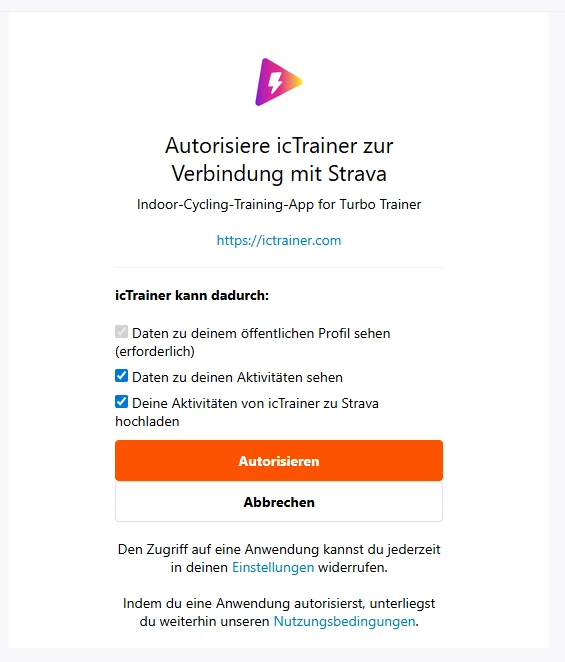
https://www.strava.com/oauth/authorize?client_id=...&response_type=code&redirect_uri=https://ictrainer.com&approval_prompt=force&scope=activity:write%2Cactivity:read
to login the user initially. But if an user was loged in in the browser yet the login for the new user does not force a new login. How can we force this? All other platforms allows in the oauth-authorization process that the complete user login is forced. 

12 replies

Jan_Mantau
Superuser
Forum|alt.badge.img+27
  • Superuser
  • December 1, 2025

In case you mean the user login for Strava you don’t have any influence on that and why would you meddle in that anyway? Forcing the user to renew a login to Strava would be unnecessary and annoying. Or do you mean the the user authorization for your app? In that case you should clarify what behaviour you expect contrary to what happens now.


Forum|alt.badge.img+5
  • Author
  • Hub Climber
  • December 1, 2025

As you can see in the URL, I talk about the oauth-authorization not the login on strava.com. Our app can be used by multiple user and all of them need to grant once the oauth-authorization. For TrainingPeaks, Intervals, Humango, … this is not a problem as you can force each user to login and grant the access. But only for Strava the user logged in on strava.com is used automatically for the oauth-authorization. This is a wrong behaviour in the oauth-process.


Jan_Mantau
Superuser
Forum|alt.badge.img+27
  • Superuser
  • December 1, 2025

As you can see in the URL, I talk about the oauth-authorization not the login on strava.com. Our app can be used by multiple user and all of them need to grant once the oauth-authorization. For TrainingPeaks, Intervals, Humango, … this is not a problem as you can force each user to login and grant the access. But only for Strava the user logged in on strava.com is used automatically for the oauth-authorization. This is a wrong behaviour in the oauth-process.

That’s confusing, at first it’s not the login on strava.com and at the end it’s this login after all? Do you expect users to have more than one login on Strava?


Forum|alt.badge.img+5
  • Author
  • Hub Climber
  • December 1, 2025

No, but I expect that more than one user can login one after the other. In the oauth process there is not possibility to logout before the next user is login as strava redirect to your own website after the login and grant process was successful. This is part of the standard oauth process. 
Again, it’s necessary that the second user can use also the oauth process properly. This is not the case at the moment. 


Jan_Mantau
Superuser
Forum|alt.badge.img+27
  • Superuser
  • December 1, 2025

Something like a family pc scenario where it’s not known that everyone could use a different operating system account or at least has to logout in the browser so the next one don’t have to do that?  


Forum|alt.badge.img+5
  • Author
  • Hub Climber
  • December 1, 2025

Sorry, are you aware about the flow of the oauth2-authentication process?
This is something different to the browser usage you are talking about.

In our app two user can train parallel in the same app (and the same OS-account) and want to upload there result to Strava then. But so both need to do the oauth2-authentication. And the login for this is in the browser but it’s not allowed to use cookies there. This is fine with TrainingPeaks/Intervals/Tredict/Humango/FinalSurge/Athetica/...-oauth2-process. Only Strava has a problem with two user in a row. 


ActivityFix
Superuser
Forum|alt.badge.img+24
  • Superuser
  • December 1, 2025

https://www.oauth.com/oauth2-servers/authorization/requiring-user-login/ (emphasis is mine)

The first thing the user will see after clicking the application’s “sign in” or “connect” button is your authorization server UI. It’s up to the authorization server to decide whether to require the user log in each time they visit the authorization screen, or keep the user signed in for some period of time. If the authorization server remembers the user in between requests, then it may still need to ask the user’s permission to authorize the application on future visits.


Jan_Mantau
Superuser
Forum|alt.badge.img+27
  • Superuser
  • December 1, 2025


Sorry, are you aware about the flow of the oauth2-authentication process?
This is something different to the browser usage you are talking about.

In our app two user can train parallel in the same app (and the same OS-account) and want to upload there result to Strava then. But so both need to do the oauth2-authentication. And the login for this is in the browser but it’s not allowed to use cookies there. This is fine with TrainingPeaks/Intervals/Tredict/Humango/FinalSurge/Athetica/...-oauth2-process. Only Strava has a problem with two user in a row. 
 

That’s a very special use case. You should have have led with that so we don’t have to wonder why you would need this forced login in the first place. Seeing ​@ActivityFix excerpt the answer to your original queation would be: It cannot be forced for Strava and it’s not a required part of the oauth2 workflow. So if these are always the same two users in your app you should save their respective access and refresh tokens for later usage instead of trying to reauthorize.


Forum|alt.badge.img+5
  • Author
  • Hub Climber
  • December 1, 2025

I store the token, that’s not the issue. The problem is that for all other platforms (and we have 18 platforms in our app, so 17 are fine, one is not) I can get the token also for the second user but not for Strava. The other platforms have the possibility to force a login if we don’t have a token.

For Strava the flow is:
- first user log does the login and grant
- we get the redirect from Strava
- we need to display Strava.com in the browser to allow the user to log out there
- we can start the login process for the second user

But I understand this is a lack of functionality on Strava side. So we need to open a feature request for it.


Forum|alt.badge.img+9
  • Hub Climber
  • December 2, 2025

Some Strava app devs avoid this issue by presenting the logged in athlete profile name/pic to the user after the OAuth process, and asking the user to confirm it’s their profile. 
 

This means having to then deauthorise the athlete and go through the OAuth process again when the user wants to pick a different profile. 
 

I think a better solution for all would be if Strava presented the logged in user name and profile pic on their OAuth page. This would remove some privacy concerns for multi-user devices. 


Forum|alt.badge.img+5
  • Author
  • Hub Climber
  • December 2, 2025

“This means having to then deauthorise the athlete and go through the OAuth process again when the user wants to pick a different profile.” 
→ But before the user can start the OAuth process again, we need to be sure that no user is logged in  as there is not “Log Out” on the OAuth confirmation page and that the OAuth process is starting from the scratch. There is the need that we can force to start the OAuth-process from the scratch to avoid this or the picture is displayed and the possibility to log out first.


Forum|alt.badge.img+9
  • Hub Climber
  • December 4, 2025

Logging users out of a 3rd party app wouldn’t be reasonable, or the right way to do fix this issue. You should let the user know what the problem is (if there is a problem) and then let them log off Strava if they wish to.