

Answered

Share option not working

  • September 7, 2025
  • 6 replies
  • 109 views

Forum|alt.badge.img+1

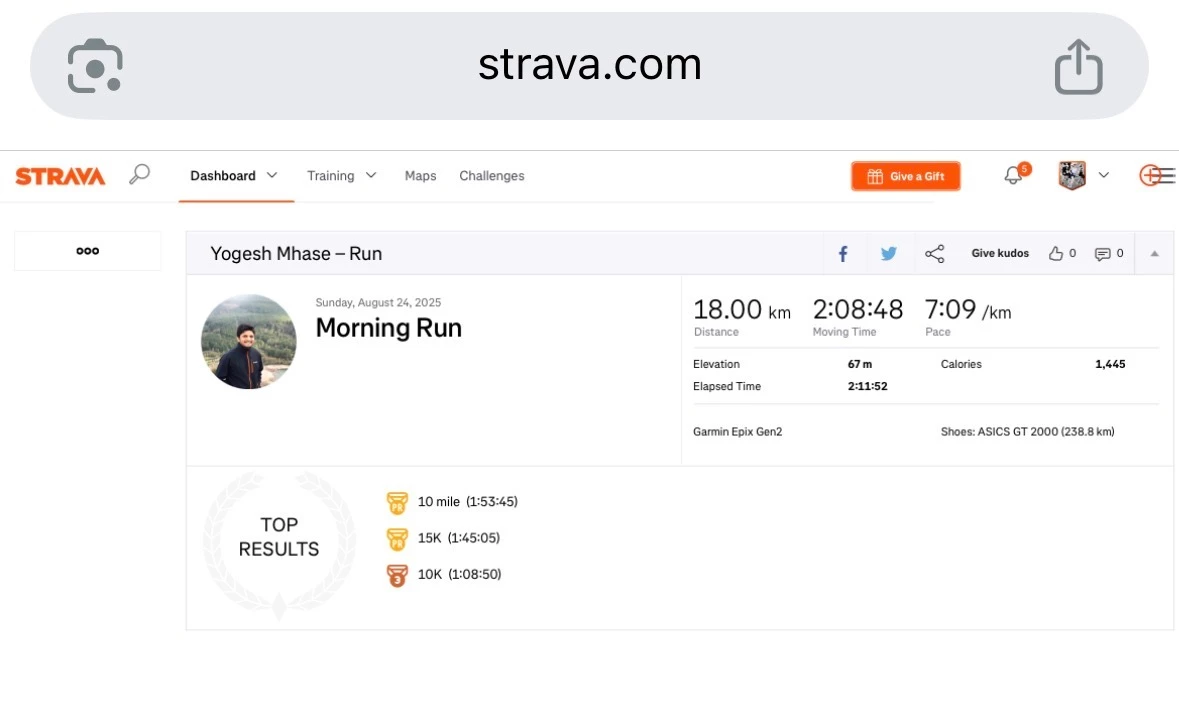
Earlier, when I clicked on "Share", I used to see multiple options — one with only stats, one with map and stats, etc. But now I can see only one option, which is the transparent one.

I have made the activity visible to everyone and removed all privacy restrictions, but it still shows only one sharing option.

Best answer by Jana_S

I can but there's no map, nothing except of the basic details. So either there's no gps data, or you’ve set the map to private..?


6 replies

Jana_S
Superuser
Forum|alt.badge.img+29
  • Superuser
  • September 7, 2025

Hi ​@yogeshmh,

does your run actually include gps (map) data? That could cause this (and seeing that there's no route outline on the transparent image, just the shoe icon, would seem to indicate that it's it).

Would you mind posting the activity link here so that someone can have a look? Thanks.


Forum|alt.badge.img

Antes, al hacer clic en "Compartir", veía varias opciones: una con solo estadísticas, otra con mapa y estadísticas, etc. Pero ahora solo me sale enviar a, publicar en. 

He hecho que la actividad sea visible para todos y he eliminado todas las restricciones de privacidad, pero todavía muestra solo una opción para compartir.


Forum|alt.badge.img+1
  • Author
  • Hub Rookie
  • October 3, 2025

Jana_S
Superuser
Forum|alt.badge.img+29
  • Superuser
  • Answer
  • October 3, 2025

I can but there's no map, nothing except of the basic details. So either there's no gps data, or you’ve set the map to private..?


Forum|alt.badge.img+1
  • Author
  • Hub Rookie
  • October 3, 2025

I found it, map visibility was ON. I turned it off. Now my share option shows map. 
Thanks for reply!


Jana_S
Superuser
Forum|alt.badge.img+29
  • Superuser
  • October 3, 2025

Cool, glad to hear that it works now 👍🙂
