Answered

Uploading routes issues

  • January 31, 2026
  • 6 replies
  • 49 views

Forum|alt.badge.img+1

Hi team, just trying to understand more about a couple of things. 1) We publish some routes as a trailbuilding club. Using the GPX file is mostly fine however, some routes present some kind of distortion from the original path riden. The Strava website seems to be using the heat map algorithim. Instead of highlighting  some single track bits, switch backs, etc, the map shows the path over some back roads or just more riden paths. 2) to fix that I tried using the editing tool which also turns out to be not allowing me to pull the dots and correct back to the riden path. Any idea would be nice. Thanks!

Best answer by Jan_Mantau

If you switch the view from satellite to standard, does the track exist on the map?

It doesn’t

There you have it, Strava can’t make a route on tracks it doesn’t know. You have to use the mentioned manual mode, it’s a bit cumbersome though.

For how to contribute to improve the maps you can read https://support.strava.com/hc/en-us/articles/216917717-About-Strava-Maps, but it won’t help you directly.

For the existing activities Strava just shows what was recorded, that is completely independent on tracks and roads.


6 replies

Jan_Mantau
Superuser
Forum|alt.badge.img+27
  • Superuser
  • January 31, 2026

In the editing tool in the web browser you should enable “Follow most direct” instead of “Follow most popular” to disable the influence of the heatmap. Furthermore “Any surface type” should be toggled on so Strava won’t switch back to the wrong roads. If that does not help it can be due to missing trails in the Strava map and you have to use the “Manual mode”.


Forum|alt.badge.img+1

In the editing tool in the web browser you should enable “Follow most direct” instead of “Follow most popular” to disable the influence of the heatmap. Furthermore “Any surface type” should be toggled on so Strava won’t switch back to the wrong roads. If that does not help it can be due to missing trails in the Strava map and you have to use the “Manual mode”.

Thank you Jan. However, just tried the way you said and still not working…


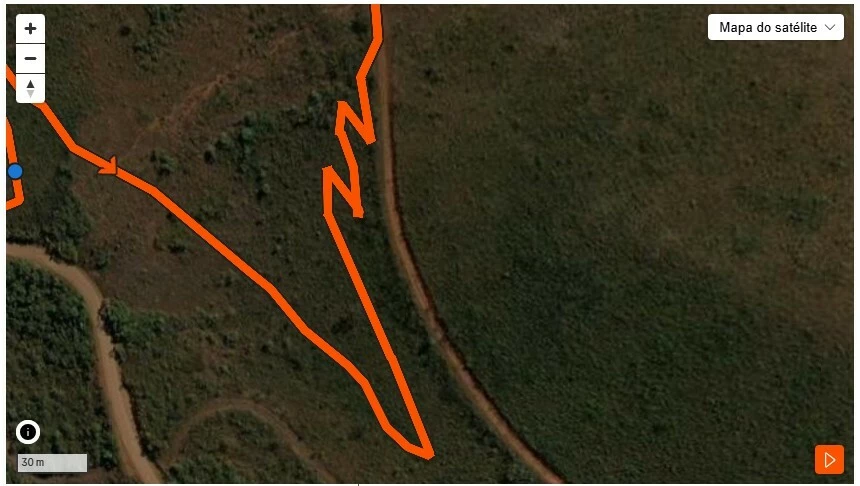
You can see belo the gpx file and how strava drags the highlight path to the service road next to the single track bit. I understand the service road has seen more traffic but still hard to understand the single track (zig zag section) is not followed. To make things stranger. If I upload the same file as an activity then is fine, the file and its coordnates are clear. Please see also how strava uploads the same gpx file.


Jan_Mantau
Superuser
Forum|alt.badge.img+27
  • Superuser
  • February 1, 2026

If you switch the view from satellite to standard, does the track exist on the map?


Тімоті_Перріш
Forum|alt.badge.img+11

This is most likely due to the route incorrectly mapped on the base layer. Unless you want to learn to edit traces in OSM, which would eventually correct the trace on that layer, your best bet is to use the "manual" mode to create routes. Unfortunately, even when you import a route it will attempt to snap to existing traces on any attempt to edit.


Forum|alt.badge.img+1

If you switch the view from satellite to standard, does the track exist on the map?

It doesn’t


Jan_Mantau
Superuser
Forum|alt.badge.img+27
  • Superuser
  • Answer
  • February 2, 2026

If you switch the view from satellite to standard, does the track exist on the map?

It doesn’t

There you have it, Strava can’t make a route on tracks it doesn’t know. You have to use the mentioned manual mode, it’s a bit cumbersome though.

For how to contribute to improve the maps you can read https://support.strava.com/hc/en-us/articles/216917717-About-Strava-Maps, but it won’t help you directly.

For the existing activities Strava just shows what was recorded, that is completely independent on tracks and roads.