
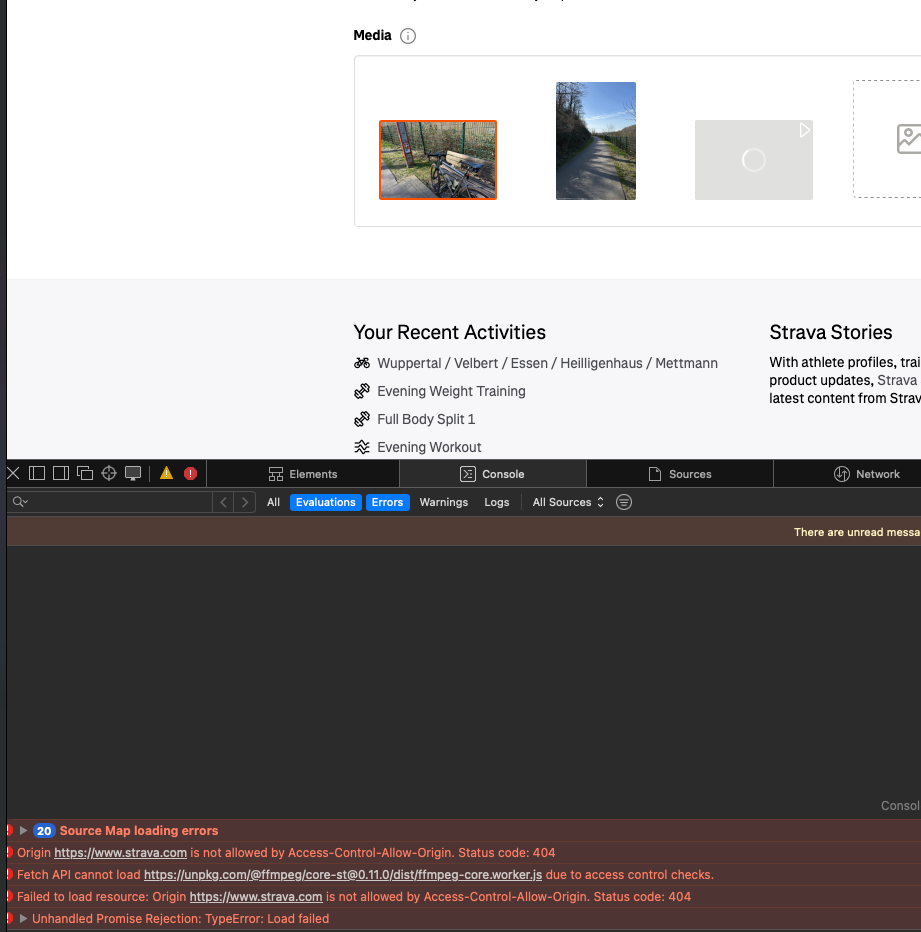
Video Upload failes because of Access-Control-Allow-Origin on Safari

  • March 21, 2025
  • 6 replies
  • 339 views

Hi there,

I encountered an upload issue on my Edit Activity page when trying to add a video to my activity. See screenshot below. I’m happy to share the HAR file of that request and the detailed URL on a private channel. The issue is repeatable. OS: MacOS 15.3.2 (24D81) / Safari: Version 18.3.1 (20620.2.4.11.6).

Let me know if you need anything else.


6 replies

Forum|alt.badge.img
  • Hub Starter
  • March 23, 2025

I have the same problem with firefox/librewolf.

Also video-upload isn’t working anymore with the strava-app.


Forum|alt.badge.img
  • Hub Starter
  • March 29, 2025

Video uploads aren’t working for me at all (Firefox on Windows). Just getting the spinning uploading circle on the edit page, I don’t get any errors or timeout, it just never appears to upload. This has been happening for at least 3 days now. ​@support any information on this, it seems like it’s not just me?

Edit: yes, I’ve cleared cache/cookies, tried another browser (Edge 💀), and tried different video clips.


Forum|alt.badge.img+1
  • Hub Rookie
  • March 29, 2025

Video uploads also not working from Zwift


Forum|alt.badge.img

Same here. Videos stopped uploading last week.

The upload circle progress as normal, but then when it finishes an exclamation mark inside a triangle appears… even with very short videos.

I have tried from three different browsers (Firefox, Chrome, Edge) on two different Windows PCs (one Windows 10, one Windows 11) on different networks (WiFi & hard wired Ethernet).

The problem must be with Strava’s system, since I did not change how I do the uploads.

Still photos and ride data upload just fine.


Forum|alt.badge.img
  • Hub Starter
  • April 3, 2025

Same here. Videos stopped uploading last week.

The upload circle progress as normal, but then when it finishes an exclamation mark inside a triangle appears… even with very short videos.

I have tried from three different browsers (Firefox, Chrome, Edge) on two different Windows PCs (one Windows 10, one Windows 11) on different networks (WiFi & hard wired Ethernet).

The problem must be with Strava’s system, since I did not change how I do the uploads.

Still photos and ride data upload just fine.


Same thing here. Maybe they’re having issues with their video hosting provider. [Edit - I was mistaken about claiming previously posted videos were gone, they’re still displaying. Sorry!]


Forum|alt.badge.img

Video uploads worked for me today. Finally. Glad they fixed it. Would’ve been nice if they had acknowledged the issue. Could have spared us much frustration and troubleshooting.
