
Answered

[KNOWN ISSUE] App crashes every time I try to open an activity (Android)

  • October 5, 2025
  • 60 replies
  • 4286 views

Show first post

60 replies

Forum|alt.badge.img
  • Hub Starter
  • November 7, 2025

I have lost 2 months of membership to this issue. As well as the frustration of not being able to use a product you pay for, I also have to wait out the expiration period as I paid for a whole year.. This can’t be how it should be when you are paying for a service...


Forum|alt.badge.img
  • Hub Starter
  • November 7, 2025

Already posted on this thread above a few weeks ago. The problem is worse now...now my Strava crashes without doing anything. I open the app and after 5-10 seconds it just closes. I've deleted cache, reinstalled, restarted my phone and the problem remains. This is so frustrating!


Forum|alt.badge.img
  • Hub Starter
  • November 12, 2025

J’ai exactement la même expérience :

  • Migration Android d’un Realme X2 pro à un Pixel 9 pro XL
  • Strava marche très bien sur Realme
  • Sur Pixel : Strava s’ouvre mais plante soit au bout de quelques secondes, soit sur une action comme consulter une activité
  • Appli désinstallée et réinstallée, vidage cache, suppression des données : rien n’y fait

Strava est inutilisable.

Quelle est la conduite à tenir ? (mis à part devoir faire un factory reset !)

Merci par avance


Forum|alt.badge.img
  • Hub Starter
  • November 16, 2025

Having exactly the same issue. 

My previous phone was also a Pixel 6a and I used Strava on that for years just fine. Can't imagine there's a pattern there in Pixel models, but you never know 🤷

So yh, currently unable to do most things with Strava on my Pixel 8 Pro. IT syncs with Garmin in the background and uploads my activities but I can't click into them and browsing to most parts of the app cause it to crash, including the Record feature.


Forum|alt.badge.img
  • Hub Starter
  • November 16, 2025

Same issue here. New Phone Google Pixel 9 pro. My other Phone, Google Pixel 8 pro wasn't an issue. 


Exact same problems here. 


JeffPaul
Forum|alt.badge.img+2
  • Author
  • Hub Rookie
  • November 17, 2025

Just as a follow up, I still haven’t received a response from Strava on my email (sent a month ago) asking about the status of this issue. So, I decided I would just open a new ticket referencing my original ticket # to see if I can get any kind of response and updated info. I’ll post it here if and when I do but I am on the verge of cancelling my subscription and if that time comes, I sure hope they ask why I am cancelling!


Forum|alt.badge.img
  • Hub Starter
  • November 23, 2025

I'm still seeing this issue..When is Strava planning to fix this? It's been over a month!!!!


Forum|alt.badge.img
  • Hub Starter
  • November 24, 2025

Strava team, same issues here. Please fix the bug for us.

It’s awful to run on something that can’t sync to Strava properly. 


Forum|alt.badge.img
  • Hub Starter
  • November 25, 2025

Same issue with new pixel 8! Reeeally frustrating! 


Forum|alt.badge.img
  • Hub Starter
  • November 28, 2025

Fix this bug! I can't use strava now!!


Forum|alt.badge.img
  • Hub Starter
  • November 30, 2025

I have had the same issue since moving from a pixel 6 to a 7 pro. Is this there any workaround that anyone has had success with?


Jan_Mantau
Forum|alt.badge.img+27
  • Hub Superuser Alumni
  • November 30, 2025

I have had the same issue since moving from a pixel 6 to a 7 pro. Is this there any workaround that anyone has had success with?

The workarounds are using the mobile web browser for viewing activities (not the best experience though) and using other apps for recording activities, preferredly those who sync to Strava like Wahoo Fitness. 


Forum|alt.badge.img
  • Hub Starter
  • November 30, 2025

Hi, happened to me as well after a factory reset on my Pixel 7

Found a workaround and now the app is not crashing anymore :

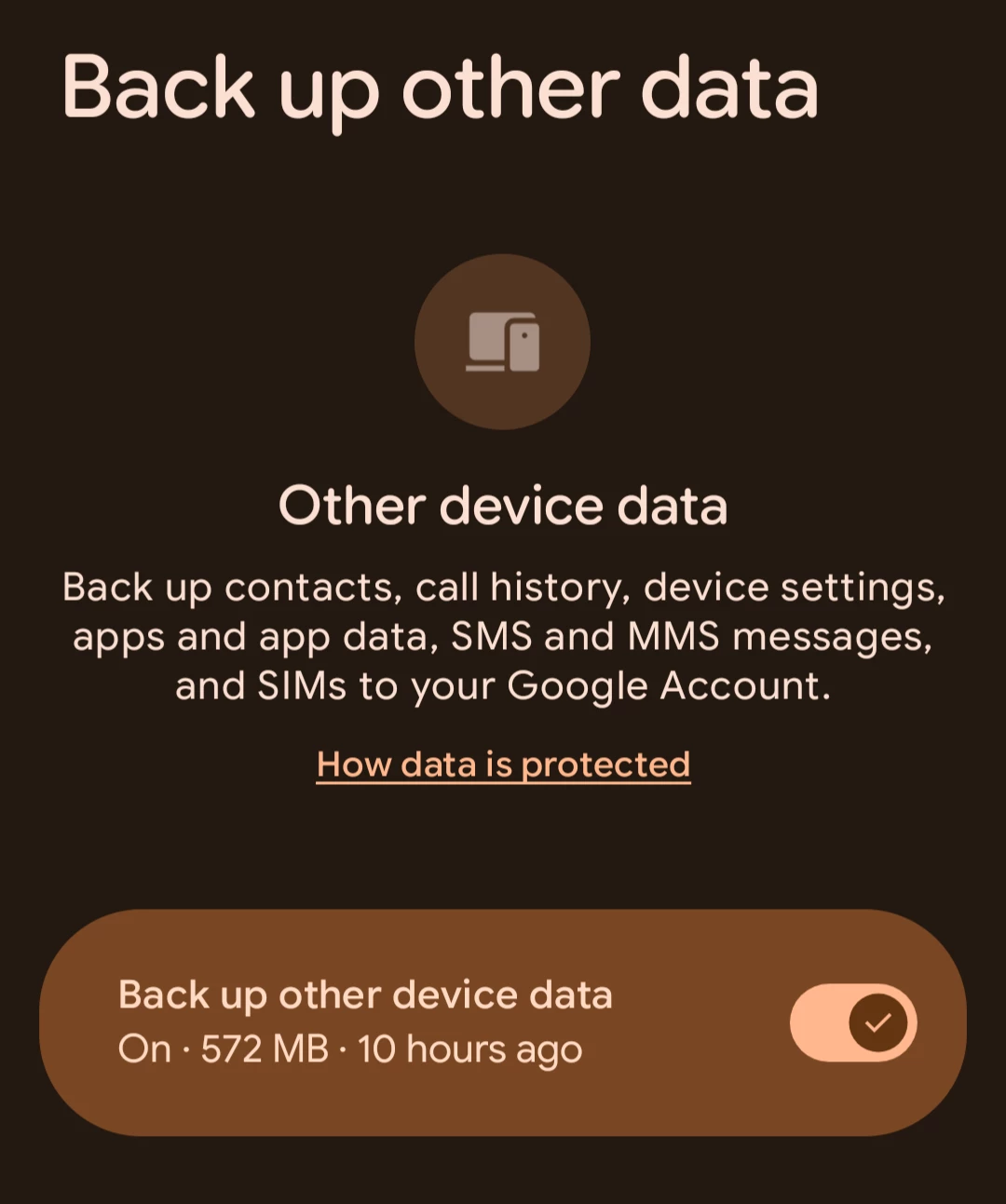
Delete cache and local storage > Disable backup of device data > Uninstall Strava app > Reboot phone > Reinstall Strava > Re enable backup

It really seems to be a problem with corrupted data and Google backup.

Hope it will help 


Jan_Mantau
Forum|alt.badge.img+27
  • Hub Superuser Alumni
  • November 30, 2025

That’s a nice find ​@killerofgnom! If someone can confirm that this indeed a Google caused problem by restoring incompatible backups to new Strava installations we can mark that as the best answer.


Forum|alt.badge.img
  • Hub Starter
  • December 1, 2025

Is this the setting you mean to disable ?


Forum|alt.badge.img
  • Hub Starter
  • December 1, 2025

Is this the setting you mean to disable ?


Yes sorry my phone's in french so I didn't know the exact name of the option on English 


Forum|alt.badge.img

Hi, happened to me as well after a factory reset on my Pixel 7

Found a workaround and now the app is not crashing anymore :

Delete cache and local storage > Disable backup of device data > Uninstall Strava app > Reboot phone > Reinstall Strava > Re enable backup

It really seems to be a problem with corrupted data and Google backup.

Hope it will help 


I’ve tried the exact steps above - but it keeps crashing as per usual.

Has this worked for anyone else? 


Forum|alt.badge.img
  • Hub Starter
  • December 1, 2025

Tried it, did not work..


Forum|alt.badge.img
  • Hub Starter
  • December 2, 2025

Damn.

The only thing I see I’ve done before those steps (except the very obvious reboot and uninstall of the app and delete cache) is to delete app preferences (Settings > Apps > See all apps > three dots menu > Reset app preferences) which is annoying cause it reset notification preferences for all apps and didn't fix anything on its own.

Maybe also instead of rebooting try turning off completely the phone, wait a minute then restart 

Otherwise I just got lucky I guess


Forum|alt.badge.img

Can someone please find a solution to this


crispyrad
Forum|alt.badge.img
  • Hub Starter
  • December 4, 2025

Also migrated to Pixel 8 pro and having this issue. Tried clearing cache, reset app preferences, turn off backup data, deleting app, restarting device and reinstalling app...


strava still crashes :(


Forum|alt.badge.img+1
  • Hub Starter
  • December 5, 2025

Tried the workaround proposed. It did not work for me. Pixel 9 Pro. 2 months already waiting for a solution 


Forum|alt.badge.img+1
  • Hub Starter
  • Answer
  • December 5, 2025

A(n ugly) workaround is to install the app in a Private Space. Such a thing is available on Pixel phones running Android 15 and later.

https://support.google.com/android/answer/15341885?hl=en


  • Hub Starter
  • December 6, 2025

A(n ugly) workaround is to install the app in a Private Space. Such a thing is available on Pixel phones running Android 15 and later.

https://support.google.com/android/answer/15341885?hl=en

I can confirm it works. Thank you.


Forum|alt.badge.img
  • Hub Starter
  • December 7, 2025

Same issue here pixel 9, any updates about the issue?