Answered

[Resolved] Monthly Activities locking Progress Screen

  • May 21, 2025
  • 26 replies
  • 599 views

Forum|alt.badge.img+1

Using iOS 18.4.1

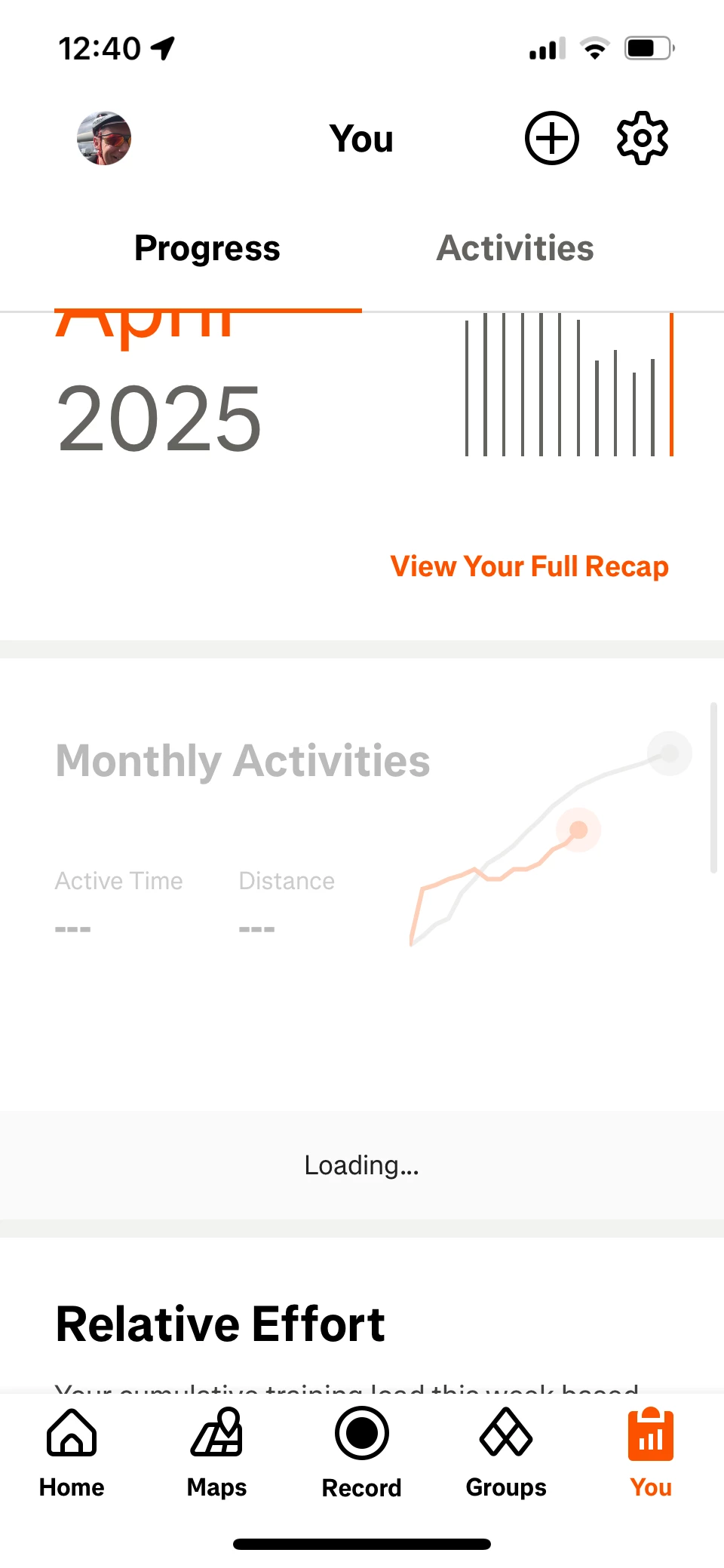
when I bring up the Progress screen and scroll down, the screen is locking when the Monthly Activities graph appears. (The graph is not updated). This seems to have happened since 411.0.0 release. The only way to unfreeze is to close the app. Have tried phone power cycle and delete and reload app, but no change.

Anyone else seeing this?
Best answer by Marya

Hi everyone, we just heard from the team -- a fix for this should be out around next week, in the next app update (version 416). Thank you for your patience! 

26 replies

Forum|alt.badge.img+1
  • Author
  • Hub Rookie
  • May 21, 2025

Here’s a screen grab - 


Jana_S
Superuser
Forum|alt.badge.img+29
  • Superuser
  • May 22, 2025

Hi ​@Zcottb,

version 412.0.0 is now available in the AppStore, could you please try whether it's fixed in it?


Forum|alt.badge.img+1
  • Author
  • Hub Rookie
  • May 22, 2025

Hi Jana_S

I tried that, but the same thing is happening.


Forum|alt.badge.img
  • Hub Starter
  • May 24, 2025

Having the exact same problem on iPhone. Uninstalled app, reinstalled, logged off and back in, same issue. It totally locks up the whole app if I try to view my monthly activity. As a matter of fact my graphs are identical to yours. Come on Strava!


Jana_S
Superuser
Forum|alt.badge.img+29
  • Superuser
  • May 24, 2025

@Zcottb ​@Mwags  just a thought… what iPhone model is it? There was a device-specific bug on iOS that has recently been fixed so that makes me wonder whether this could be related. 

(I couldn't reproduce this on iPhone 15 Pro, just like as that recently fixed issue, so there's something specific about it)


Jan_Mantau
Superuser
Forum|alt.badge.img+27
  • Superuser
  • May 24, 2025

When I look at that on my IPhone SE it works and suddenly there is this ugly subscriber shield icon besides the monthly progress. So it seems something was changed since the reports came in and maybe it works now?


Forum|alt.badge.img+1
  • Author
  • Hub Rookie
  • May 24, 2025

It wasn’t working on my iPhone13. Last night my phone automatically updated to 18.5. The problem is still there, and now it’s worse!! Whenever I click on an activity (mine or someone else’s), it says “Sorry, something went wrong” “Try Again”.


Forum|alt.badge.img
  • Hub Starter
  • May 24, 2025

Still no go for me.


Forum|alt.badge.img+1
  • Author
  • Hub Rookie
  • May 24, 2025

Still no go for me.


Yep - for me too. Although at least the “Sorry, something went wrong” message seems to have cleared itself this evening. Strange. Software blames hardware, hardware blames firmware, firmware blames them both ;-)


Forum|alt.badge.img+1
  • Hub Rookie
  • May 26, 2025

Hi I’m on iPhone 12 with iOS 18.5 and updated Strava to v412.0.0 (r48111) yesterday but this exact issues is still happening today.  Notice this seems to have stopped working a few weeks ago. 

Come on guys!  please get a fix out?  thanks  


Rixter
Superuser
Forum|alt.badge.img+18
  • Superuser
  • May 26, 2025

I can confirm the same on my iPhone 13 running IOS 18.5. Been thru 3 Strava updates but none have fixed the issue. 


Forum|alt.badge.img
  • Hub Starter
  • May 27, 2025

Same happening to me. iPhone 14. Ios18.5. Started a couple weeks ago. 


Rixter
Superuser
Forum|alt.badge.img+18
  • Superuser
  • May 29, 2025

It’s also on my iPhone 8 running IOS 17 


Bryant
Community Manager
Forum|alt.badge.img+26
  • Community Manager
  • May 29, 2025

Hello everyone,

Thank you for bringing this to our attention.
I can confirm this is now a known issue and it's been escalated to our Engineering team for investigation.

Unfortunately, at this time I am unable to provide an expected resolution time frame. We appreciate your patience in the meantime.

For anyone new experiencing this issue please continue to provide your device, iOS version, and Strava version you’re running as this is beneficial to our engineers.


Forum|alt.badge.img
  • Hub Starter
  • May 31, 2025

This is also happening to me on my iPhone. I’m on iOS 18.5 and Strava version 413.0.0 App crashes and freezes on the Monthly Progress tab, says it’s loading but once happens the app has crashed. Been happening for about a week. 


Forum|alt.badge.img
  • Hub Starter
  • June 1, 2025

Same here. Re-installed the app, logged out and in. Restarted phone. Did not fix the issue.

iOS 18.4.1

iPhone 15 Pro

Please fix it!


Forum|alt.badge.img+1
  • Author
  • Hub Rookie
  • June 4, 2025

Working this morning with iOS 18.5 and Strava 413.0.0. So no software updates?  Something server end???


Forum|alt.badge.img+1
  • Hub Rookie
  • June 5, 2025

I’m now on Strava version v413.0.0 (r48213) iPhone 12 with iOS 18.5 and this issue seems fixed.  Previously it was on (r48111) and didn’t work so hopefully update the app should fix it? 


Forum|alt.badge.img
  • Hub Starter
  • June 7, 2025

Mine was working until yesterday, and I haven’t updated either the app not the iOS since then. I have an iPhone Mini 13, running iOS 18.5.


Forum|alt.badge.img
  • Hub Starter
  • June 8, 2025

Hello everyone,

Thank you for bringing this to our attention.
I can confirm this is now a known issue and it's been escalated to our Engineering team for investigation.

Unfortunately, at this time I am unable to provide an expected resolution time frame. We appreciate your patience in the meantime.

For anyone new experiencing this issue please continue to provide your device, iOS version, and Strava version you’re running as this is beneficial to our engineers.


Where can I get the strava app version?


Forum|alt.badge.img
  • Hub Starter
  • June 8, 2025

Mine was working until yesterday, and I haven’t updated either the app not the iOS since then. I have an iPhone Mini 13, running iOS 18.5.

When I looked in the app store it said 414.0.0


Jana_S
Superuser
Forum|alt.badge.img+29
  • Superuser
  • June 8, 2025


For anyone new experiencing this issue please continue to provide your device, iOS version, and Strava version you’re running as this is beneficial to our engineers.


Where can I get the strava app version?

In the mobile app, go to tab You > tap the gear icon on top right to open Settings > Help, and the version number will be displayed in the bottom 


Forum|alt.badge.img+1
  • Author
  • Hub Rookie
  • June 8, 2025

Yep - stopped working again for me😡 seems like 414 un-did the 413 fix. Can I install previous version from App Store??


Forum|alt.badge.img
  • Hub Starter
  • June 9, 2025

Problem was fixed for like a day and now same issue again. This is absolutely ridiculous considering I pay for premium.


Forum|alt.badge.img
  • Hub Starter
  • June 10, 2025

Mine was working until yesterday, and I haven’t updated either the app not the iOS since then. I have an iPhone Mini 13, running iOS 18.5.

When I looked in the app store it said 414.0.0

I am now on 415.0.0, and it still happens. 
 

really looking forward to this being resolved. I use this section of the app daily.